

September 2025 Release Highlights
5 new system tables are available
SQL Server connector now supports SCD type 2
Databricks Online Features stores powered by lakebase is available
🛠️Data Engineering
SQL Server Connector supports SCD type 2
History Tracking or SCD determines how to handle changes in the data over time. 📖 Documentation
Lakeflow Declarative pipelines improvements
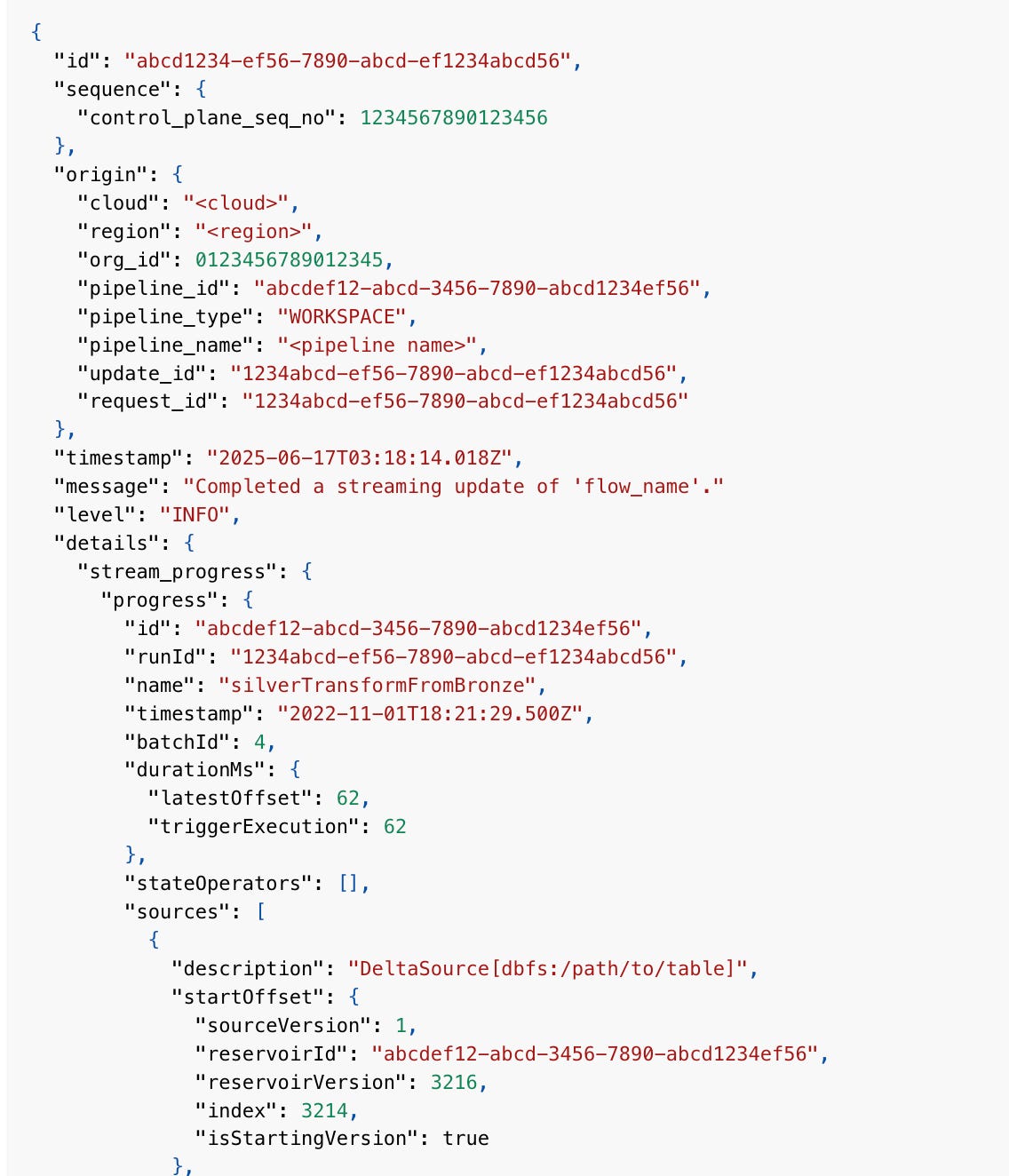
Lakeflow Declarative Pipelines supports querying the event log for metrics about the progress of a stream
You can use Python custom data sources and sinks in Spark Declarative Pipelines.
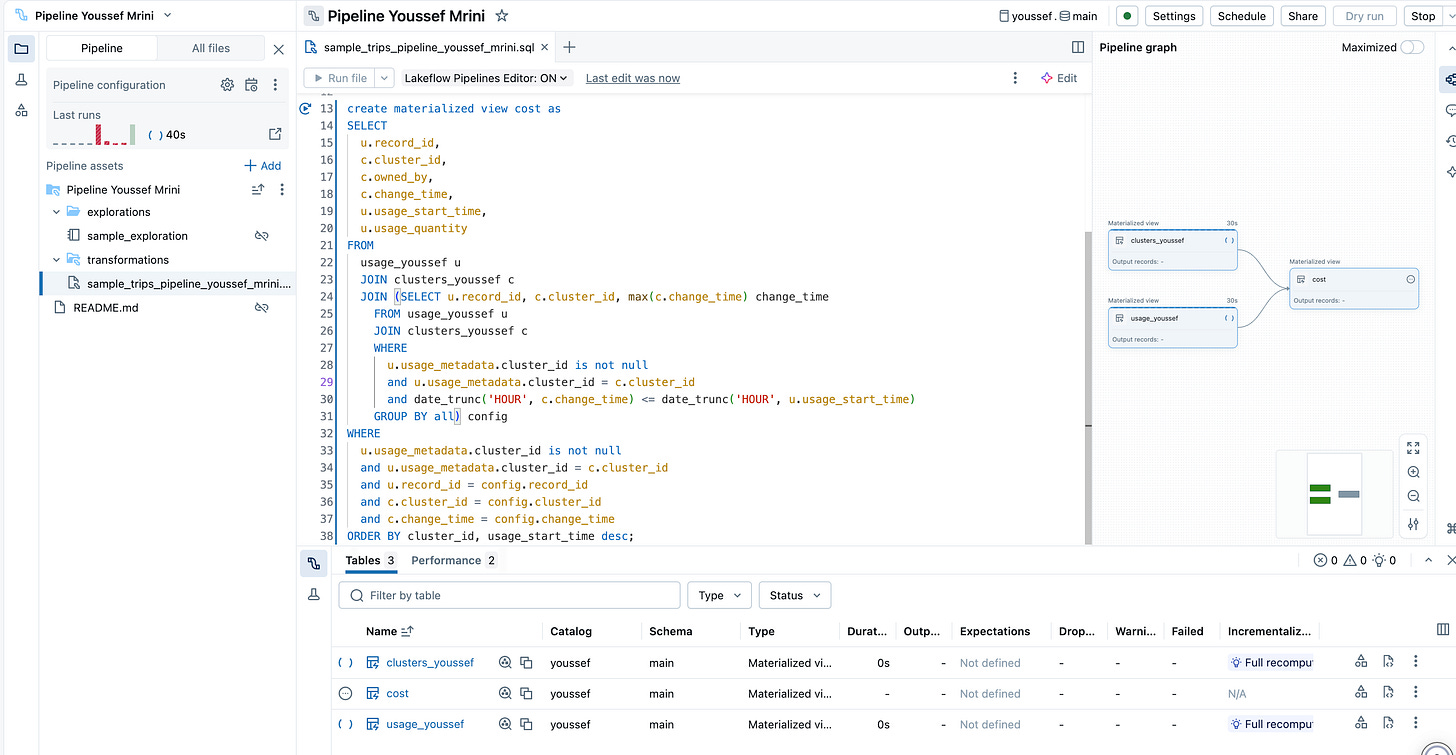
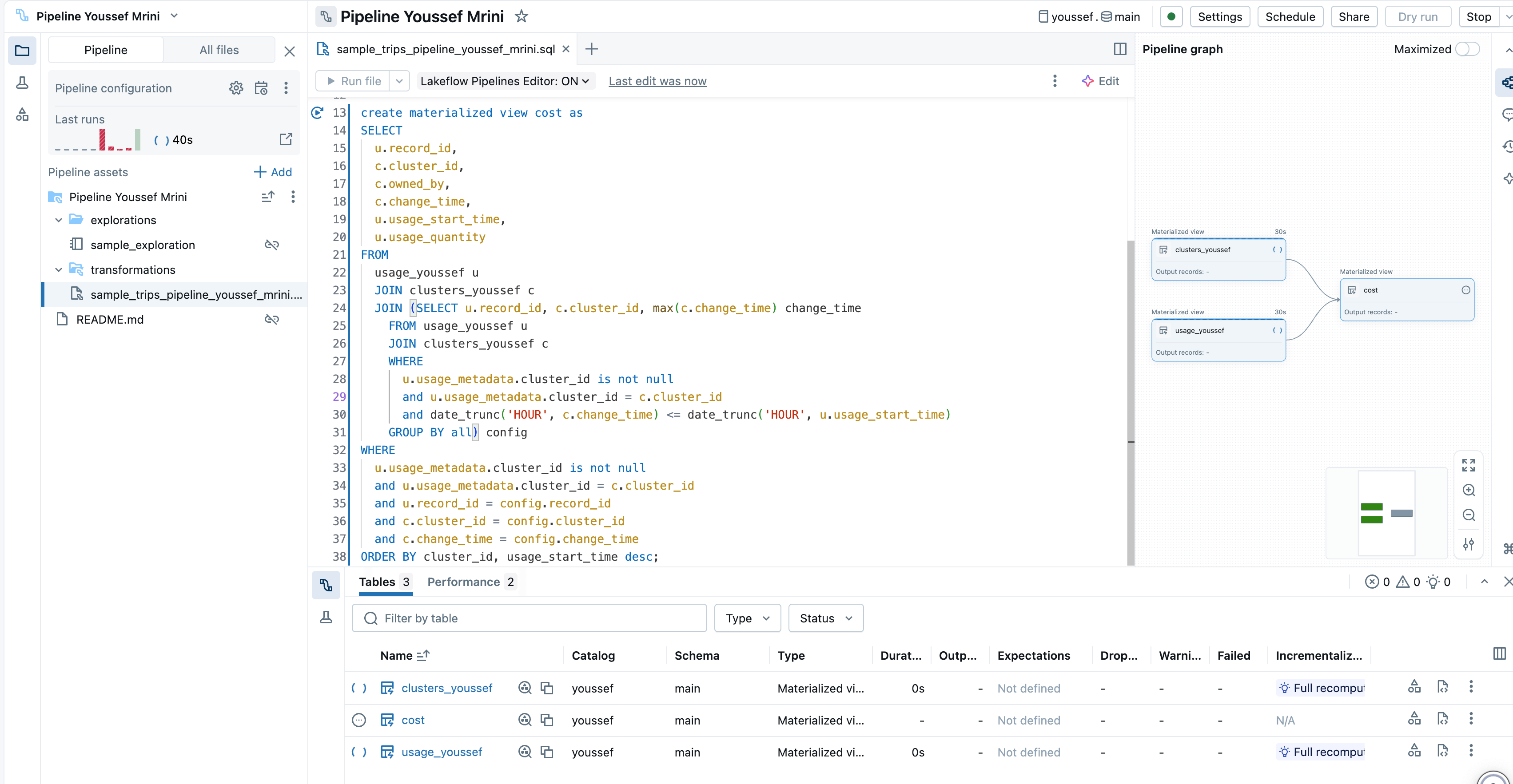
The Perks of using Lakeflow Pipelines editor
All-in-one experience: Build edit and debug ETL pipelines in one place. No more window switching
Code-first workflows: Work in Python or SQL, across multiple files. Organize code just how you like it.
Real-time previews: Get instant previews of your data and tables directly inside the editor.
Easy debugging: Spot issues fast with execution insights, an issues panel, and direct navigation to errors in your code.
Pipeline graphs: See your data pipeline visually
Version control & scheduling: Integrate your pipeline with Git and run it on a schedule for peace of mind.
Flexible runs: Test a single file, a single table, or the whole pipeline iterate quickly, deploy confidently.
Default folder structure: Start organized, stay organized with pre-built folders for transformations, explorations, and utilities.
Notifications: Get alerts when things go wrong (or right), right out of the box.
Preview and monitor: New, improved monitoring for complete visibility into pipeline runs.
Bridging SAP BDC and Databricks: New connector delivers Seamless, secure data sharing
The SAP BDC Connector enables secure zero-copy data sharing between SAP BDC and a Unity Catalog-enabled Databricks workspace. You can access and analyze the data on Databricks and share Databricks data assets back.
Databricks Runtime 17.2
The
LIKEoperator supports theUTF8_LCASEcollation, allowing for case-insensitive matching.The
EXPLAINcommand and Spark UI forRemoteSparkConnectScanon dedicated compute now display predicates, aggregations, group by clauses, limits, and samples that are pushed down into the remote scan.You can declare multiple sessions or local variables of the same type and default value in a single
DECLAREstatementYou can use the
TEMPORARYkeyword when creating a metric view.Fine-grained access control on dedicated compute supports the
FSCK REPAIR TABLEandDESCRIBE DETAILcommands.INSERT REPLACE USINGreplaces rows when theUSINGcolumns compare equal under equality.INSERT REPLACE ONreplaces rows when they match a user-defined condition.ANSI_MODEis enabled by default for Pandas API.Auto Loader infers partition columns from file paths when ingesting data as a semi-structured variant type using the
singleVariantColumnoption.Databricks includes user-defined environment settings in the
DESCRIBE CONNECTIONoutput for JDBC connections that support custom drivers and run in isolation. Other connection types remain unchanged.You can truncate uniform history when migrating tables with Uniform/Iceberg enabled using
ALTER TABLE...SET MANAGED. This simplifies migrations and reduces downtime compared to disabling and re-enabling Uniform manually.You can specify Delta read options for SQL-based streaming queries using the
WITHclause.SELECT * FROM STREAM tbl WITH (SKIPCHANGECOMMITS=true, STARTINGVERSION=X);Databricks shares the execution environment for Python user-defined table functions (UDTFs) from the same owner and Spark session. An optional
STRICT ISOLATIONclause is available to disable sharing for UDTFs with side effectsDatabricks enables row tracking by default for all newly created Unity Catalog managed tables. Existing tables are not affected and maintain their current row tracking settings.
🖥️Platform
Serverless jobs and pipelines configured in the UI are now performance optimized by default.
Tables backed by default storage can be shared to any recipient.
Databricks Connector in Microsoft Power Platform
You can use Databricks data to build canvas apps in Power Apps, flows in Power Automate and agents in Copilot Studio by creating a Databricks connection in Power Platform. 📖 Documentation
Databricks Apps support for Genie resources
Databricks Apps supports adding an AI/BI Genie space as an app resource to enable natural language querying over curated datasets. 📖 Documentation
Mount Delta Shares to an existing Shared catalog
Delta Sharing recipients can mount shares received from their Delta Sharing provider to an existing shared catalog. 📖 Documentation
Delta Sharing on Lakehouse federation is available
You can use Delta Sharing to share foreign schemas and tables created with query federation in Databricks-to-Databricks sharing and open sharing.
Databricks One is available for everyone
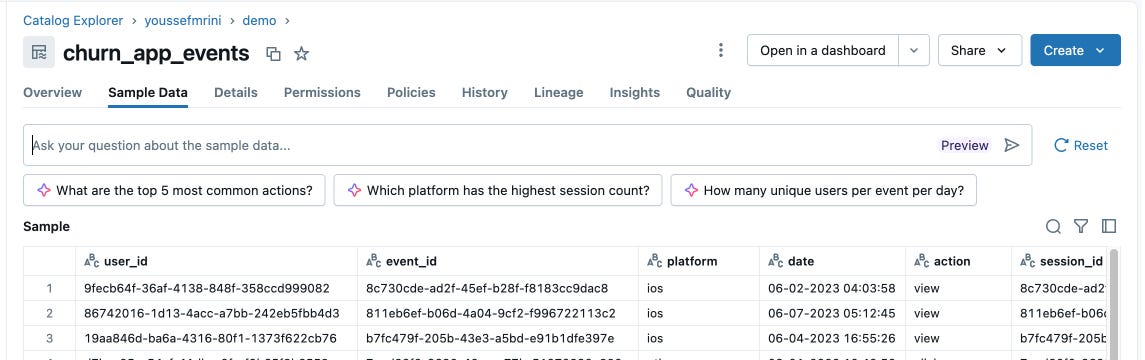
Explore table data using an LLM
You can ask natural language questions about sample data using Catalog Explorer. The Assistant uses metadata context and table usage patterns to generate a SQL query. You can then validate the query and run it against the underlying table.
Requirements for the Salesforce ingestion
In early September 2025, Salesforce began restricting the use of uninstalled connected apps. This restriction does not break existing Unity Catalog connections to Salesforce but it prevents you from creating a connection to a new Salesforce instance without the Databricks connected app installed.
System tables updates
system.lakeflow.pipeline_update_timeline provides complete historical tracking of pipeline updates and supports fine-grained analysis of update activity, triggers, results and compute usage.
system.data_classification.results: stores detections for sensitive data classes at the column level across enabled catalogs in your metastore.
system.mlflow. experiments_latest: records experiment names and soft-deletion events. This data is similar to the experiments page in the MLflow UI.
system.mflow.run_metrics_history: records the name, value, timestamp, and step of all metrics logged on runs, which can be used to plot detailed timeseries from runs
system.mlflow.runs_latest: records run-lifecycle information, the params and tags associated with each run, and aggregated stats of min, max, and latest values of all metrics.
🤖GenAI & ML
AI Agents: Authorize on behalf of user
AI agents deployed to Model Serving endpoints can use on-behalf-of-user authorization. This lets an agent act as the Databricks user who runs the query for added security and fine-grained access to sensitive data.
Databricks Assistant Agent Mode: Data Science Agent
Mosaic AI Agent framework supports automatic authentication passthrough for Lakebase resources. 📖 Documentation
Databricks Online Features stores is available
Feature Stores powered by Lakebase provide highly-scalable low-latency access to feature data while maintaining consistency with your offline feature tables. 📖 Documentation
Serverless GPU compute now supports H100 accelerators
Route Optimized endpoints require route optimized url path for querying
All newly created route-optimized endpoints must be queried using the route-optimized URL.
Claude Opus 4.1 is available as a Databricks hosted foundation model

📝AIBI Genie
Benchmarks run in the background: Benchmarks run as background tasks. Users can start a run without blocking their workflow.
Improved benchmarks accessibility: Benchmarks are available from the top-line toolbar for easier access.
Notifications for benchmarks: A notification encourages users to run benchmarks after making changes to instructions.
Upgraded large language models: The LLMs used by Genie to author SQL have been upgraded for improved accuracy and performance.
SQL autocomplete: Autocomplete is now available when editing Genie SQL to help users write queries more efficiently.
Feedback API endpoints: Thumbs up and thumbs down feedback API endpoints are now available for collecting user feedback on Genie responses.
Suggested follow-up questions API: Suggested follow-up questions through the API are now available.
Consumer entitlement API access: Users with the workspace consumer entitlement can now use the API suite.
Warehouse ID in API responses: GET API requests for Genie spaces include the
warehouse_idattached to the space.Increased value dictionary limit: Spaces can include up to 120 value dictionaries. Newly created spaces automatically select 120 columns.
Improved accuracy for percentage questions: Genie returns more accurate results for percentage-type queries.
Space ID field in settings: A new field in the settings page lets users directly copy the Genie space ID for use in building Genie space agents.
New API endpoints: List conversation messages,Delete conversation message,List all conversations
Unified permission APIs: Genie uses the Databricks Permission APIs. 📖 Documentation
Improved Benchmarks evaluation: The evaluation function now classifies results more flexibly.📖 Documentation
📊AIBI Dashboard
Global filters panel expanded by default: The global filters panel opens by default when users first visit a dashboard to improve discoverability.
Genie credential handling for embedded dashboards: Genie integrated with dashboards published with embedded credentials now runs generated queries using the publisher’s data credentials. Dashboards published without embedded credentials continue running using the viewer’s data credentials.
Simplified publish dialog: The dashboard publish dialog has been redesigned and simplified.
Improved text widget editor: The dashboard text widget has an enhanced UI for formatting text, adding links, and inserting images.
Active filter bar: A new filter bar shows all active filters on a dashboard. Any filter not set to All, as well as any cross-filtering, appears in this bar.
Minimum and maximum aggregations for date fields: Date fields support minimum and maximum aggregations.
Improved histogram labels: Histograms display both the start and end of each bin.
🛡️Governance
Access requests in Unity Catalog
🔍 Data Warehousing
You can use LIKE with columns that have one of the following collations enabled: UTF8_Binary, UTF8_Binary_RTRIM, UTF8_LCASE, UTF8_LCASE_RTRIM 📖Documentation
You can now use the ST_ExteriorRing function to extract the outer boundary of a polygon and return it as a linestring. 📖Documentation.
You can declare multiple session or local variables of the same type and default value in a single DECLARE statement.
You can use the TEMPORARY keyword when creating a metric view.
You can specify Delta read options for SQL-based streaming queries using the WITH clause.
SELECT * FROM STREAM tbl WITH (SKIPCHANGECOMMITS=true, STARTINGVERSION=X);