
Databricks shipped the following major GA launches in September 2026:
Spark Declarative Pipelines (SDP): Lakeflow Spark Declarative Pipelines now feature structured maintenance windows for continuous runs, zero-reprocessing migrations (
import_checkpoint), multi-source append flows, and explicit cascade deletion (cascade: true) for Unity Catalog tables.Governance & ABAC Security: Metastore-level Attribute-Based Access Control policies and explicit DENY rules are now GA in Unity Catalog, automatically enforcing data protection and access rules across all present and future catalogs.
Connectors & Data Applications: Lakeflow Connectors reached GA for Anaplan, Anysphere, and Celigo, while Genie One’s MCP server was officially made generally available for AI assistant workflows.
🛠️Data Engineering
Databricks Spark Declarative Improvement
You can schedule an hour maintenance window for continuous Lakeflow pipelines to control when Databricks applies updates that require a pipeline restart (such as runtime upgrades and serverless infrastructure maintenance).
How to configure: Select your preferred day of the week, start hour, and time zone.
Databricks guarantee: System maintenance will only initiate within your designated hour window.
Where to set it up: Available in the Jobs UI, Pipelines UI, or via the Jobs REST API.
Key Takeaway: Prevent unexpected downtime by restricting platform updates and pipeline restarts to your preferred low-traffic hours.
Lakeflow pipelines support creating managed tables and populating them using one or more append flows. Additionally, migrating existing Structured Streaming workloads into pipelines is now seamless with the new
import_checkpointfeature.Multi-Source Append Flows (Beta): Route data from multiple append flows into a single managed target table.
Zero-Reprocessing Migration: Use
import_checkpointon an append flow to migrate existing Structured Streaming queries into Lakeflow pipelines without re-reading source history.
Key Takeaway: Simplifies pipeline migrations from standalone Structured Streaming and enables multi-writer append patterns into managed tables without data duplication or backfilling.
When deleting a Unity Catalog pipeline using the default publishing mode via the UI or the Pipelines
DELETEAPI:Default Behavior (Cascade = False): Deleting the pipeline retains all associated materialized views, streaming tables and views.
Retained tables remain queryable.
Retained tables cannot be updated until reassigned to an active pipeline.
Complete Cleanup (Cascade = True): Set
cascade: truein theDELETEAPI request to delete the pipeline and all its Unity Catalog managed tables simultaneously.
Key Takeaway: Pipeline deletion no longer automatically drops Unity Catalog tables. To wipe everything, explicitly specify
cascade: truein your API calls.
New Lakeflow Connectors are available
Same APIs, better performance
Automatic CDF computes row-level changes at query time instead of at write time, leveraging row tracking (Delta Lake) and row lineage (Apache Iceberg v3).
Zero Table Setup: Works automatically on any supported table without needing manual table configurations.
Faster Writes & Lower Storage Costs: Skipping change calculations during
MERGE INTOandUPDATEoperations speeds up ingestion and reduces storage overhead.100% Backward Compatible: Uses the exact same APIs (
table_changes(),readChangeFeed) and supports Batch, Structured Streaming, and OpenSharing.
Key Takeaway: Upgrade to faster write performance and reduced storage costs without rewriting your existing queries or data pipelines.
Zerobus Ingest updates
Apache Arrow support for Zerobus Ingest in Lakeflow Connect is GA.
Why It Matters ? Producers can stream in-memory
RecordBatchdata directly into target Delta tables over Arrow Flight. This avoids costly serialization/deserialization cycles, maximizing throughput for high-volume tabular workloads.
Ingesting into tables backed by default storage with Zerobus Ingest in Lakeflow Connect is Public Preview.
Why It Matters? Simplifies table setup by allowing you to stream low-latency data directly into standard Unity Catalog managed tables without requiring custom external storage locations.
Key Takeaway: High-performance, columnar ingestion via Apache Arrow Flight is now production-ready and setting up target tables is easier with default storage support.
🗄️Lakebase Postgres and Apps
Lakebase updates
Databricks now provides two fully managed Lakebase-backed state stores for AI agents. Built as framework-agnostic persistence layers to maintain short-term conversational context and long-term knowledge.
Managed Agent Memory: Stores persistent user preferences, past takeaways and entity knowledge across multiple separate chat sessions.
Semantic Search: Features built-in vector/semantic search to retrieve relevant memories dynamically based on user intent rather than relying strictly on exact keyword matches.
Framework Agnostic: Accessible via standard APIs regardless of the agent framework powering the model.
Managed Agent Sessions: Handles execution thread state and active conversation history for a single chat session.
Automated Workflow:
Reads existing message history at the start of a turn.
Passes conversational context to the agent engine.
Appends new user/assistant turns directly to the state log as execution completes.
Serverless Scale: Offloads conversation checkpointing and state tracking to Lakebase eliminating the need to set up custom Redis instances or database schemas
The ai_search function which is currently beta can retrieve from Lakebase synced tables with Lakebase Search enabled, in addition to AI Search indexes. Add a lakebase_search knowledge source to search a Lakebase synced table, or combine it with vector_search sources in the same call.
Databricks Apps updates
OpenTelemetry Integration (GA)
Native OTel Persistence: App traces, logs, and metrics are automatically collected using the OpenTelemetry (OTel) protocol and persisted directly to Unity Catalog tables (
otel_logs,otel_spans,otel_metrics).Automatic System Logging: Databricks automatically captures system execution logs and usage events (e.g., user logins and direct API calls) upon turning on telemetry.
Custom Framework Instrumentation: Developers can add custom metrics and tracing spans using standard OpenTelemetry SDKs matching their application’s native language or web framework.
Build and iterate on full-fledged data and AI applications inside an App Space using natural-language prompts.It automatically inherits workspace and Unity Catalog security policies to enforce role-based access control on underlying datasets and models. The Built apps automatically scale down to zero instances when idle, eliminating unnecessary compute costs during inactivity.
Multi-instance horizontal scaling
Single URL Routing: Run an application across multiple parallel compute instances (1 to 5 instances) hosted behind a single, unified application URL.
Zero-Downtime Deployments: Rolling updates build and validate new code on a staging instance first before transitioning live traffic, keeping existing instances running without service interruption.
Best-Effort Session Affinity: Browser requests route back to the same backend instance using a host routing cookie, enabling localized in-memory caching and per-user session persistence.
Key Takeaway: Elevates Databricks Apps into a production-grade application tier combining enterprise OTel monitoring, no-code creation via Genie and resilient horizontal scaling with zero-downtime rollouts.
🏢Data Warehousing
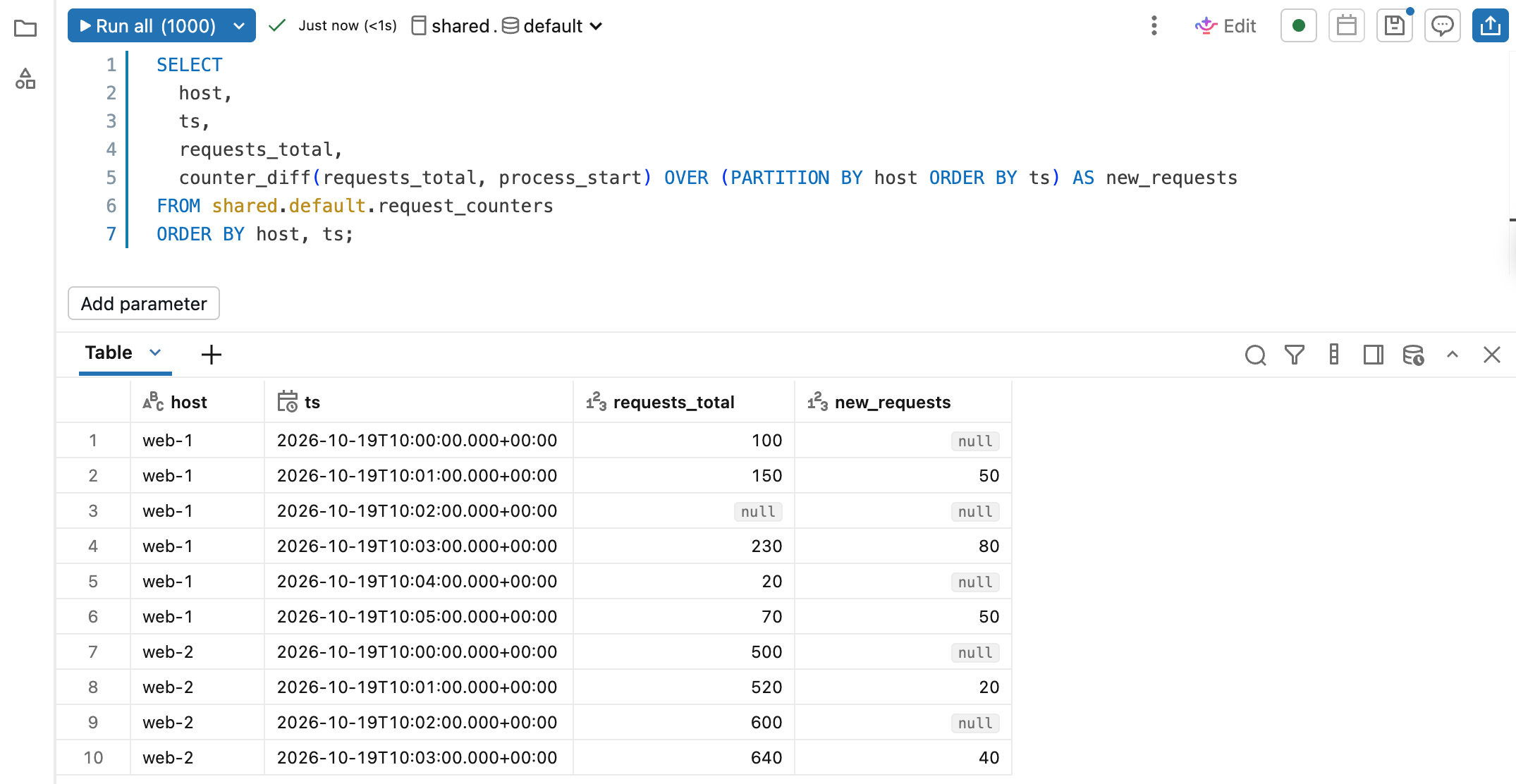
The
counter_diffwindow function calculates differences between consecutive cumulative counter values and handles counter resets, for time-series analysis of counter data.Key Takeaway: Eliminates the need for complex
CASE WHEN ... LAG()logic when calculating deltas from continuous counter telemetry in Databricks SQL and DBR 19+.Excel and Google Sheets writeback now requires a workspace admin to enable the Allow spreadsheet writeback security setting.
🤖Databricks GenAI & Machine Learning Capabilities
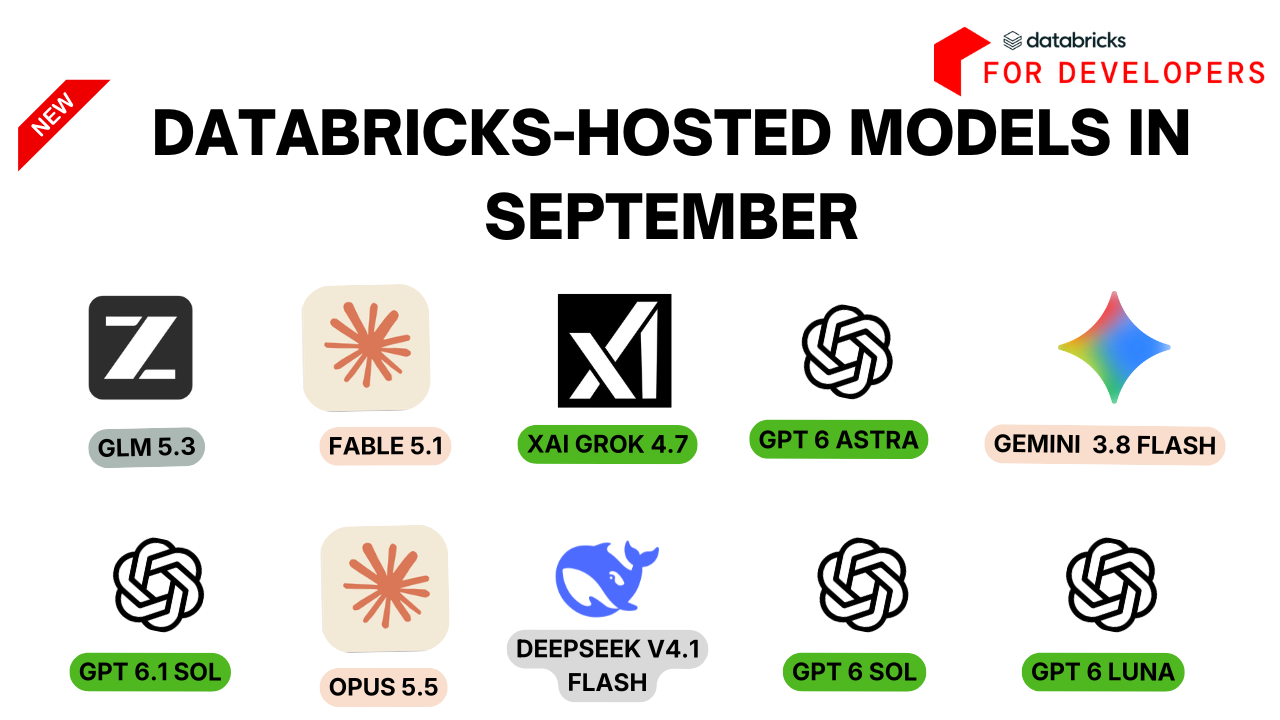
Databricks has released major updates to its AI ecosystem, highlighting the GA of Unity Gateway APIs, new governance and tracing features for AI coding agents and enhanced capabilities in ai_search and document processing.
Entreprise coding agent and Unity Gateway
Unity Gateway CLI (
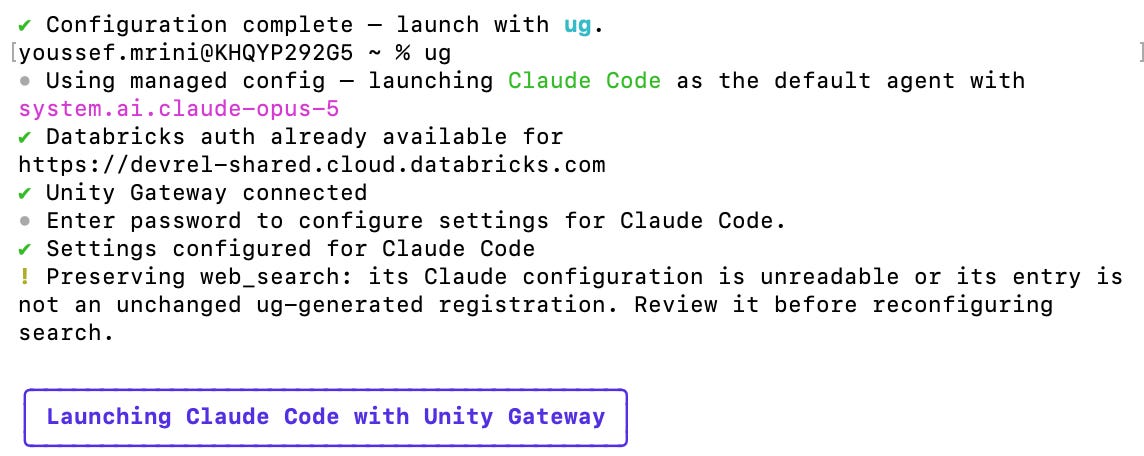
ug): Connect popular coding agents such as Claude Code, Codex to Unity Gateway with a single command.ugautomates authentication, connects approved MCP tools/skills and tracks real-time terminal spending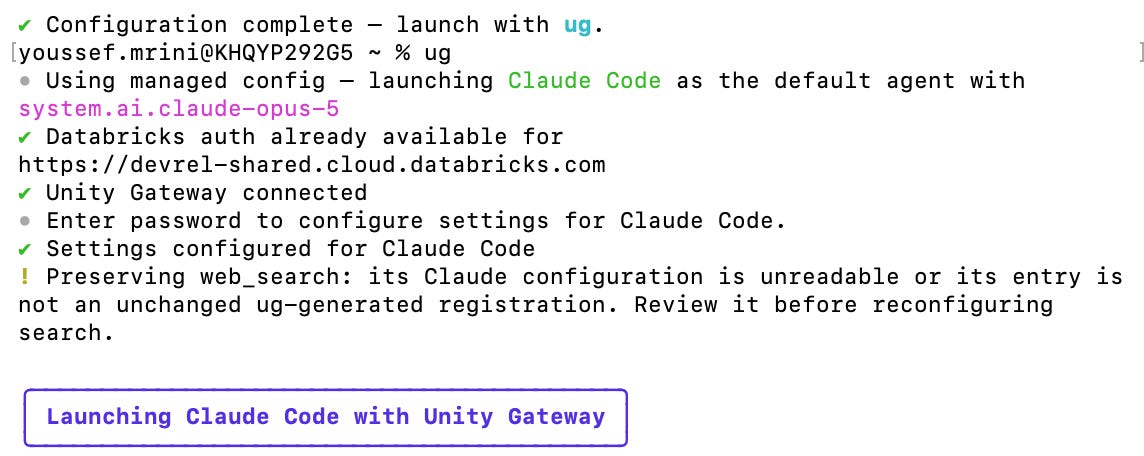
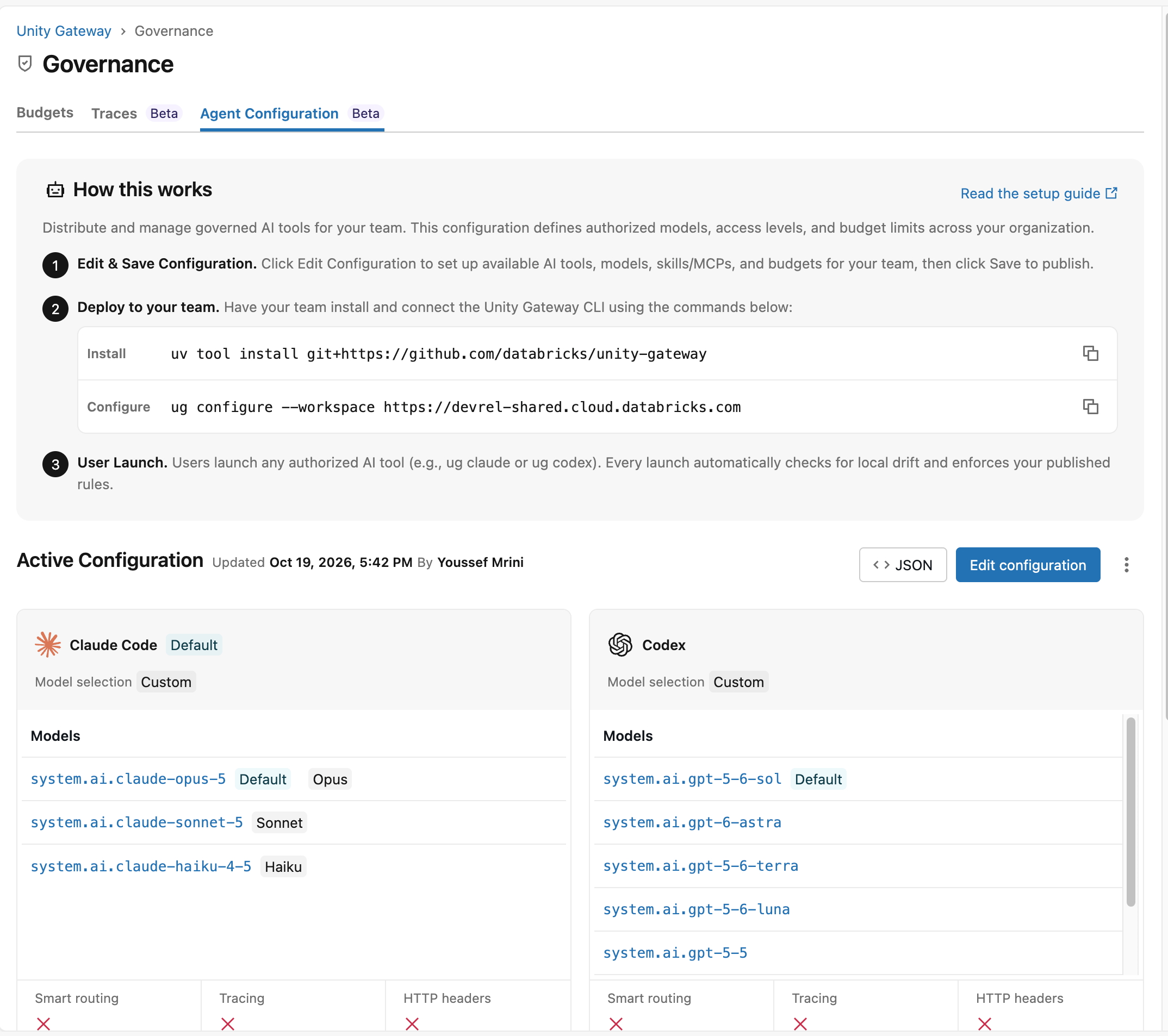
Centralized Enterprise Configuration: Organizations can centrally configure coding agents via MDM or at launch. Settings include model selection, MCP servers, custom skills, default harnesses, and Smart Routing
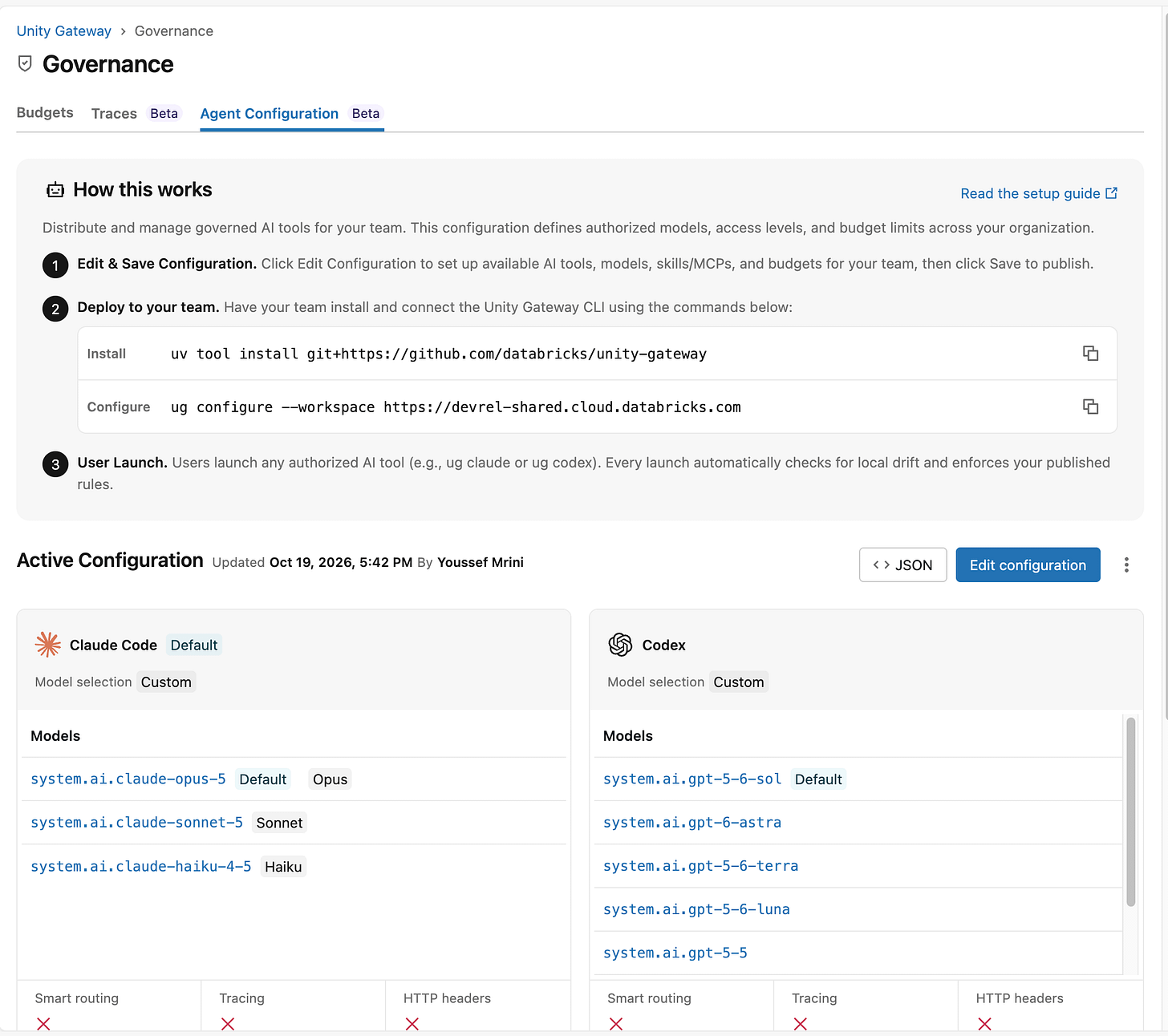
Unified Tracing & Observability: Unity Gateway extends unified tracing to coding agents, allowing admins to inspect model calls, tools, and skills used directly in Govern > Traces or via Genie.
Enhanced Telemetry & Billing: System table
system.ai_gateway.usagetracks coding-agent session metadata, invocation sources, file/web search counts and token details (including 5-minute and 1-hour prompt cache tokens).
Unity Gateway APIs and Model Provider Infrastructure
SDK & CLI GA Support: Full CRUD management for model services, provider services, and MCP services is GA across Terraform, Databricks CLI and the Python, Go, Java, and JavaScript SDKs.
Declarative Automation Bundles (Beta): Manage Unity Gateway resources via Databricks CLI Declarative Automation Bundles.
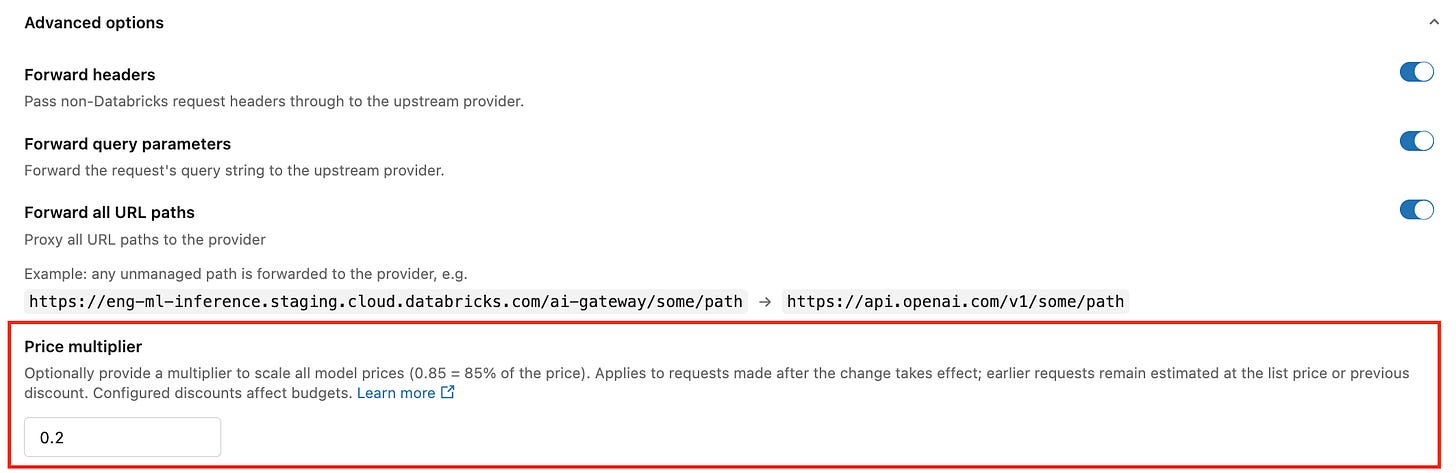
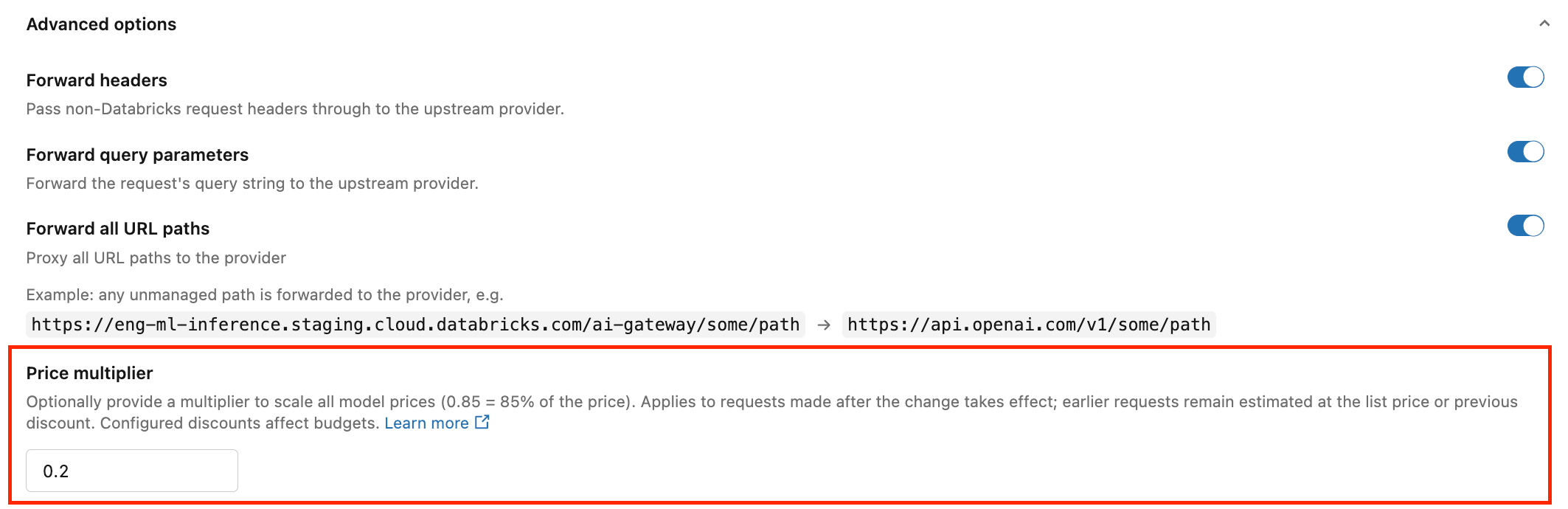
Custom Price Multipliers: Override external model list prices by configuring price multipliers on model provider services to accurately reflect negotiated enterprise rates in cost estimates.
Secrets-Backed Provider API Keys: Store model provider keys in Unity Catalog secrets. Credentials update seamlessly upon secret rotation without requiring service restarts.
End-to-End Agent Scaffolding: A new developer CLI for building, testing, and deploying custom code agents.
Integrated Agent Runtime: Scaffold projects from standard templates, test locally, and deploy to the Databricks Agent Runtime with managed memory, sessions, tools, and MLflow tracing pre-configured.
AI_search and Document Intelligence
Struct & Map Indexing:
ai_search()can now index, search, and filter complexSTRUCTandMAPcolumns.Filter-Only Mode: Execute pure metadata filter queries that match rows without triggering vector embedding or keyword retrieval operations.
Citation Generation (
generate_citations): Enablegenerate_citations = trueinai_search()to output the exact retrieved text chunks used by the model to formulate its response.ai_parse_documentEnhancements: Improved layout detection accuracy with new native support for identifying signature regions across scanned documents.
Key Takeaway: Transforms Unity Gateway into a single governed control plane for enterprise AI coding agents, providing central management, secret rotation, SDK/Terraform support, and granular cost tracing across model calls and external tools.
🖥️ Databricks Workspace Platform and Compute
Serverless compute updates
Databricks allows notebooks and files in the same Git folder to share a single, unified serverless compute instance and project environment.
Single Shared Compute: All assets in the same Git folder connect to one shared serverless resource, eliminating the need to spin up separate compute for every notebook or file.
Unified
pyproject.tomlManagement: Dependencies are defined at the root level viapyproject.toml. Changes apply automatically across all notebooks in the folder using%uv add/%uv syncor direct file edits.Shared Execution State: Includes a shared web terminal across attached assets while maintaining isolated Python variable scopes between notebooks.
Key Takeaway: Streamlines multi-file project authoring and local module imports in Git folders by sharing compute and project dependencies across all files.
You can select environment version 6 as your base environment for serverless and standard classic compute.
Databricks automatically captures the execution state during eligible serverless job runs, no manual configuration required.
Instant Debugging: Inspect in-memory Python variables, DataFrames, and temporary views as they existed at the end of the run without re-executing heavy upstream computations.
Seamless Transition: Open a new interactive notebook pre-loaded with the snapshot to test code fixes or explore job outputs immediately.
Key Takeaway: Eliminates time-consuming job reruns during post-mortem debugging by preserving the live execution context of your serverless job runs.
Admins can define custom workspace-level base environments to establish consistent, cached dependency foundations across teams.
Workload-Level Isolation: Dependency management shifts from cluster-wide installations to individual notebooks and job tasks, allowing distinct workloads on the same compute to maintain their own isolated dependencies.
Interactive & Job Task Configuration: Users can attach dependencies via a requirements format, wheels, or source directories directly from the notebook’s Environment side pane or inside Databricks Jobs configurations.
Key Takeaway: Eliminates dependency conflicts and slow cluster init scripts by standardizing base environments across classic compute while keeping notebook-level customization isolated.
Configure table retention for System Tables is Beta
Account admins can now set an account-wide retention period from 30 to 3,650 days for supported system tables. See Configure system table data retention.
Lakeflow Jobs updates
You can set performance_target to STANDARD when creating or triggering runs via the Jobs REST API. This setting is also natively supported in Apache Airflow via the DatabricksSubmitRunOperator.
Cost vs. Latency Optimization: Choosing STANDARD allows you to select a balanced performance profile for non-latency-critical background jobs, helping optimize compute efficiency and resource allocation.
Key Takeaway: Gives data engineers programmatic control over job performance modes directly from the Jobs API or Airflow DAGs to better balance runtime speed and compute costs..
Databricks Lakeflow Jobs allow Table Update Triggers to monitor changes on Delta Sharing / OpenSharing objects and Unity Catalog system tables.
System Table Monitoring: Automatically trigger downstream auditing, alerting, or reporting workflows whenever new operational data is logged to Databricks system tables (e.g., billing, audit logs, cluster usage).
OpenSharing Event Automation: Initiate data processing or ETL pipelines as soon as shared external data or third-party datasets are updated via OpenSharing.
Low-Latency Workflows: Eliminates the need for fixed polling schedules by triggering jobs immediately upon table mutation.
Key Takeaway: Streamlines event-driven architectures by allowing job executions to react instantly to changes in external shared data and workspace audit logs.
Automatic deletion for unused OAuth Client secrets
Databricks now automatically deletes a service principal's OAuth client secret after 90 days without use, consistent with unused access token cleanup.
🛡️Unity Catalog and OpenSharing
OpenSharing updates
You can share metric views with Databricks users in other metastores or accounts using OpenSharing.
Sharing and reading foreign schemas, Delta tables, Iceberg tables and foreign tables with OpenSharing are GA
You can invite OpenSharing recipients by email instead of exchanging a sharing identifier or credential file.
Sharing metric views with OpenSharing is GA.
Key Takeaway: Extends OpenSharing beyond standard Delta tables to metric views, foreign assets, and Iceberg format while making consumer onboarding as easy as sending an email invite..
External secrets in Unity Catalog is Beta
External secrets connect a Unity Catalog schema to AWS Secrets Manager. The secrets appear in Unity Catalog as read-only securable objects that you govern with Unity Catalog privileges. Databricks reads their values from AWS Secrets Manager on demand.
UDFs improvements
Session-scoped and Unity Catalog Scala UDFs can now access secrets managed in Unity Catalog
Scalar and Batch Unity Catalog Python UDFs are GA on all supported compute types.
Data Classification is getting better (Beta)
Databricks Data Classification extends sensitive data scanning beyond standard tables to Unity Catalog views (including streaming tables and materialized views), utilizing the same AI-powered classification engine. It uses the exact same classification models to scan view definitions and underlying query outputs to identify sensitive data like PII, financial attributes, or regulatory identifiers.
Attribute-Based Access Control updates
Databricks has introduced major enhancements to Attribute-Based Access Control (ABAC) and dynamic data masking in Unity Catalog (requiring Databricks Runtime 19 or above).
Metastore Level ABAC Policies: Governance teams can attach ABAC policies (row filters, column masks,
GRANT, andDENY) at the metastore level. It automatically applies data protection rules across every present and future catalog in the metastore without requiring manual policy replication.ABAC DENY POLICY: Introduce explicit
DENYrules that always take precedence over any explicitGRANT. It can specifically restrict theMANAGE ACCESS CONTROLprivilege, preventing object owners or administrative principals from modifying access rules on sensitive assets.
ABAC EXTENSIONS TO VIEWS AND TIME TRAVEL:
Views Protection (Public Preview): ABAC row filters and column masks now extend directly to views, enabling granular security on virtualized datasets (configurable via the workspace settings Previews page).
Policy-Enforced Time Travel (Beta): Query historical table states using time travel while maintaining strict ABAC row and column security rules.
Complex Data Support: A single
VARIANTfunction can dynamically mask semi-structured and nested data types includingARRAY,MAP,STRUCT, and scalar types, simplifying mask definitions across complex schemas.
Key Takeaway: Streamlines enterprise data governance by enabling single-point, metastore-wide policy enforcement across dynamic views, complex data types and historical time travel queries.
Databricks Tags
Databricks natively supports tag management across dashboards, notebooks, Databricks apps and Genie Agents.
Supported Tag Types:
Ungoverned Tags: Open key-value pairs created directly by users to flexibly categorize workspace assets.
Governed Tags: Centralized, policy-restricted key-value tags controlled by admins to enforce consistent taxonomy across the workspace.
System Tags: Predefined system tags (such as
certification_statusfor marking assets as certified or deprecated).
Unified Search & Discovery: Asset tags integrate directly with the workspace search bar, allowing teams to filter and locate relevant notebooks, dashboards, or apps by tag key and value.
Access Control: Applying governed tags requires specific assignment privileges, ensuring compliance and classification policies are adhered to.
Key Takeaway: Simplifies data governance and workspace organization by applying consistent classification, lifecycle status,and cost-center tags to non-table assets like notebooks, apps, and dashboards.
📝Genie Agents
Databricks has released several major updates to Genie Agents, significantly increasing capacity limits, enhancing model capabilities, and expanding monitoring tools.
Scalability & System Limits
Higher Data Source Limits: Connect up to 50 data sources per agent (tables, views, or metric views), increased from 30.
Expanded Conversation Capacity: Store up to 200,000 conversations per agent (up from 10,000).
Larger Document Uploads: Upload PDF files of up to 100 pages (increased from 20) for Genie One and Genie Agents.
Model Intelligence & Tooling
Upgraded Chat Models: Chat mode is now powered by upgraded large language models for more accurate data reasoning.
SQL Function Tool Descriptions: Agents can now view full descriptions when SQL functions are provided as tools.
Strict Source Boundary: Agents strictly execute queries against explicitly attached sources, preventing unauthorized data access.
Page-Level Citations (Beta): When retrieving answers from attached volume files, citations now link directly to the specific source page.
Admin & Usage Monitoring
Extended Trend Summaries: Summarize up to six months of agent activity directly from the Monitor tab.
Customizable Monitoring Table: Added a column picker to customize which fields and metrics appear in the activity monitor view.
The Takeaway: Significantly expands Genie Agents’ capacity for enterprise datasets and large documents while giving admins deeper auditability and tighter source control.
📲Genie One
Databricks has introduced significant feature upgrades to Genie One, expanding its web connectivity, third-party integrations, workspace accessibility and interactive steering controls.
Integrations & Native Tooling
Databricks-Provided MCP Connectors: Genie One and Genie Code natively support Model Context Protocol (MCP) connectors for tools like Google Drive, Gmail, Google Calendar, Microsoft 365, Atlassian, Slack, and GitHub.
Public Web Search: Genie One can autonomously search the live web for up-to-date documentation, market trends, or release notes, providing clickable source citations.
PowerPoint Support: Upload and analyze
.pptxpresentation files directly inside conversations.Multi-File Skills (Beta): Custom skills support nested file structures up to 3 folders deep and 50 text files/folders per skill.
The Genie One MCP server is GA
Real-Time Interaction & Memory Controls
Backend Steering: Send real-time guidance or correction prompts to Genie One while it is generating an answer without waiting for execution to finish.
Memory Confirmation Prompts (Beta): When Genie One detects relevant facts or preferences, it prompts you to confirm, edit, or reject the suggestion before saving it to long-term memory.
Pinned Chats: Pin important or active conversation threads to the top of the sidebar.
Enterprise Access & Mobile Enhancements
Account-Only User Access: Enterprise users registered in an Identity Provider (IdP) can access account-level Genie One without needing workspace assignments or consumer licenses.
Mobile MCP Write Actions (Beta): The Genie mobile app supports interactive write operations via connected MCP tools.
Scheduled Task Push Notifications (Public Preview): Receive iOS push notifications for scheduled Genie tasks directly on mobile devices.
The Takeaway: Transforms Genie One into an enterprise-wide AI assistant that connects natively to third-party tools, supports real-time steering, and expands access beyond individual workspace boundaries.
📊AIBI Dashboard
This release brings extensive additions to Databricks AI/BI Dashboards, expanding layout controls, visualization formatting, BI migration capabilities via Genie Code, and interactive filtering options.
BI Migration and Genie Code AI Authoring
Enhanced BI Import (
/importBI): Importing Tableau and Power BI reports via Genie Code now supports ranked table calculations and expanded parameterized calculations.Governed Metric View Preference: Genie Code prefers governed Unity Catalog metric views over ad-hoc SQL datasets during dashboard generation, reusing existing metric views whenever possible.
SQL Parameters & Local Metric Conversions: Genie Code understands SQL dataset parameters and can convert standard SQL datasets directly into local metric views.
Data Modeling, Relationships and Metric Views
Cross-Dataset Filtering via Relationships (Public Preview): Filters, parameters, and selections applied to one dataset automatically cascade to widgets built on connected datasets.
Relationship-Scoped Filters (Public Preview): Widgets respond strictly to filters on related datasets, preventing unrelated cross-filtering interference.
Metric View Enhancements: Supports include-style Level of Detail (LOD) expressions in the editor, and exports respect defined field display names.
Advanced visualizations and Styling
Theme Import/Export & Previews: Export dashboard themes to JSON to share across dashboards or inspect color palette previews directly in the preset theme picker.
Named Color Mappings: Map specific colors to field values by name across color-by-field and color-by-series configurations for workspace-wide consistency.
Line Shape Control: Toggle between linear, smooth, and stepped lines on area and line charts.
Geospatial Path Maps: Path maps can construct trajectory lines (e.g., GPS tracks) from point sequences using separate latitude/longitude columns or point geometry fields.
Pivot Table Enhancements: Configure default expansion levels for row/column hierarchies, format values/headers of totals independently, and apply color scales to cell text in addition to background fills.
Interactivity, Filtering and Ask Genie
Embedded Dashboard Filter APIs: Programmatically set and retrieve filter states in embedded dashboard applications.
Granular Filter Overrides: Configure specific widgets to ignore selected filters while remaining active across the rest of the dashboard page.
Contextual Ask Genie: Ask Genie uses your currently selected chart as context and displays scoped starter questions tailored to the active dashboard page and widget.
Rich Text & Dynamic
@References: Embed live, formatted aggregated metrics (like@sumor@avg) into text widgets, titles, and descriptions that dynamically update based on active filters.
Operations & Subscriptions
Data Attachments in Alerts: Scheduled dashboard subscriptions delivered to Slack and Microsoft Teams can now include CSV, TSV, or Excel data attachments.
Target Warehouse for Materialized Views: Choose the specific SQL warehouse used when exporting dashboard datasets as Unity Catalog materialized views.
Page-Level Key Insights: Automatically generates key insights per dashboard page, complete with a live generation indicator and a New Insights badge.
Key Takeaway: Transforms Databricks AI/BI Dashboards into a mature BI platform with automated Tableau/Power BI migration tools, rich custom formatting, and cross-dataset governance through native relationships.
Genie Code
Genie Code can build end-to-end document processing pipelines by orchestrating parsing, classification, extraction, and validation. Point it at unstructured PDFs, contracts, or invoices, and it evaluates extraction quality against labeled data and iterates to improve it.
📝Lakeflow Designer
The Lakeflow Designer September release adds Guardrails, multi-input joins, new parameter controls, and more ways to bring data into a visual data prep. The following updates are now available:
Multi-input ingestion and canvas workspace
Multi-File Batch Import: Upload multiple files at once using Import file > As source to instantly generate an independent
Sourceoperator for each dataset.Workspace Drag-and-Drop: Drag files directly from the workspace file browser onto the visual canvas to create new
Sourceoperators on the fly.External DB Connections: Create Unity Catalog connections and foreign catalogs directly from an unconfigured
Sourceoperator to connect external database tables.Table of Contents Sorting: Expand operator groups and sort canvas tasks by graph order, name, type, or operational status for faster navigation.
Global & Operator Preview Limits: Set workspace-wide preview row limits from the toolbar or override limits on individual operators when inspecting large datasets.
Advanced Transformations and Quality control
Guardrails Operator: Enforce automated data quality rules (e.g.,
NOT NULL,UNIQUE,ACCEPTED VALUES). Configure failing rows to issue warnings, block invalid records, or halt the workflow entirely.Multi-Table Joins: Join three or more inputs within a single
Joinoperator by defining specific relationships per added branch.Expanded Pivot Aggregations: Supports data-type-specific aggregation functions during pivoting, such as
FIRST,LAST, and stringCONCAT.Parameterization Support: Parameterize
CombineandLimitsettings, or dynamically toggle operator execution states on and off at runtime using parameters.
Extensibility and code syncing
Genie Code User-Defined Operators: Create custom local Python operators by describing the transformation in natural language. Review both the generated configuration and Python function before adding it to the canvas.
External Code Change Detection: Automatically detects code modifications made via Git or Asset Bundles outside the UI editor, locking manual and AI edits until code is re-synchronized from configuration.
Output pipeline operations
Continuous Flow Processing: Connect downstream operators directly to an
Outputoperator to perform secondary processing or logging after data writes to its target location.Advanced File Formatting: Partition CSV and Excel exports into multiple distinct files or workbook tabs, customize cell ranges and worksheet titles, and control header visibility.
Originally published on Databricks Community