
Data+AI Summit 2026 — June 15–18, 2026

Register now
🛠️Data Engineering
Query-based connectors in Lakeflow Connect are available
Query-based connectors ingest data from databases by querying the source directly using a cursor column, without requiring change data capture configuration or an ingestion gateway.
Lakeflow Designer updates:
Bidirectional AI-generated descriptions
N-way Combine
Custom join conditions
Improved filter readability
Multi-modal output types
Configurable output panel
Improved drag-to-connect hit target
Genie Code change summary
SQL and Python operators surface available parameters with inline sample code showing how to reference them.
AI operator search
Configurable sample size
Git, import, clone, and export:
User-defined operators
Lakeflow Declarative Pipelines updates
You can achieve end-to-end latency as a five milliseconds for operational streaming workloads such as real time personalization. RTM uses the new update_flow decorator which writes to sinks using update output mode and support stateful aggregation without requiring a watermark 📖 Documentation
You can use refresh policies to control when Databricks performs incremental or full refresh to optimize the costs.
You can use explain create materialized view to check whether a query can be incrementalized before defining the materialized view. 📖 Documentation
Pipeline parameters let you define key-value pairs at the pipeline level and reference them from SQL source code using named parameters 📖 Documentation
Standalone pipelines: including materialized views and streaming tables can be created from a notebook running on serverless general compute.
You can configure an environment version on a pipeline to pin the Python language version and set of preinstalled libraries decoupling pipeline's Python runtime from Databricks Runtime upgrades
New Lakeflow Connector
Google Drive managed Ingestion Connector 📖 Documentation
Use a registered connector or create your own with Community Connectors 📖 Documentation
Smartsheet Connector 📖 Documentation
Github managed Ingestion Connector 📖 Documentation
Outlook managed Ingestion Connector 📖Documentation
HubSpot Ingestion Connector 📖Documentation
Data Warehousing
You can use the connector to import and query Unity Catalog data. 📖 Documentation
You can view the run history of scheduled refreshes in the Databricks Connector for Google Sheets. 📖 Documentation
XPath no longer fetches external DTDs
NULL struct preservation in INSERT, MERGE and streaming writes with schema evolution
NullType (VOID) is supported in Delta tables
SHOW CREATE TABLE supports metric views
NATURAL JOIN respects case-insensitive column matching
SQL UDF dependency validation in Unity Catalog
Optimized writes for partitioned Unity Catalog tables created with CRTAS
CREATE OR REPLACE support for temporary tables
Delta table history includes write option flags
The following geospatial functions are available:
🖥️ Platform
Configure additional recipient for workspace operational emails
Workspace admins can add an additional email recipient to receive operational emails about a workspace. This address receives the same operational updates as workspace admins including things like breaking changes, incident communications and feature rollout announcements.
If you want to deliver to multiple people, use a distribution-list alias. 📖 Documentation
Databricks Apps Horizontal scaling
You can collect traces, logs and metrics from your Databricks Apps and persist them to Unity Catalog tables using the OpenTelemetry protocol. 📖 Documentation
Databricks Apps Horizontal scaling
You can run an app across multiple instances behind a single app URL. It provides a higher availability with zero downtime deployments and a session affinity which routes every request from a given user to the same instance so the app can keep per user data on that instance.
If you already have a standard app you can convert it to easily to horizontally scaled else you can enable it during the creation 📖 Documentation
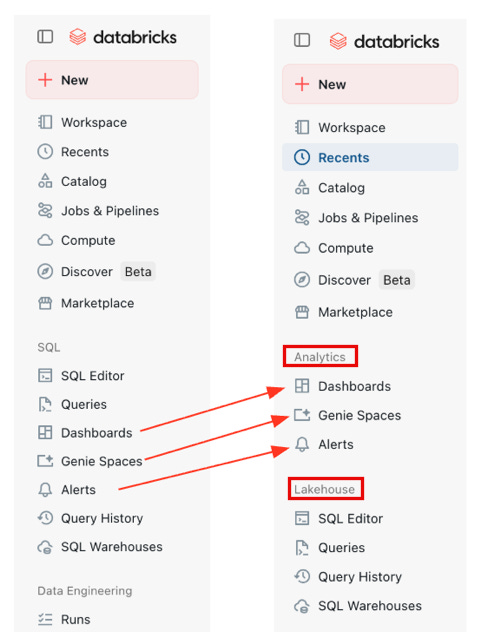
What’s new in the Workspace sidebar navigation and notebooks
You can view profiling statistics for columns in notebook results tables. From a results table, select column headers and click Open selection details to view profiling statistics.
Enforce Execution Timeouts for Serverless Notebooks
Workspace admins can configure the timeout by going to Settings > Compute and, under Serverless interactive, update the Serverless interactive execution timeout setting.
The default timeout is 2.5 hours and users can still override the timeout for an individual notebook by using spark.databricks.execution.timeout

Automatic Identity Management with Entra ID is GA
Automatic identity management lets you sync users, SPs and groups from Microsoft Entra ID to Databricks without SCIM provisioning. When enabled you can search for identities in identity federated workspaces and add them directly to your workspace and group memberships stay in sync with Microsoft Entra ID.
Account access denylist for Automatic Identity Managent
Account admins can add users, groups or SP to the denylist to block their access to the Databricks Account. Denylist membership is transitive, denying a group also denies all of its members.
System tables updates
system.compute.instance_events & system.compute.instance_pools are available. You can use these tables to track state transitions of classic compute instances and the full history of instance pool configurations across your account.
Extra
You can configure Microsoft Entra ID as the identity provider for (SSO) to Databricks from Power BI using an account-level federation policy. 📖 Documentation
You can use the OAuth U2M flow to obtain tokens as a service principal's identity instead of your own user account.
You can use the following features in workspaces encrypted with customer-managed keys:
Production monitoring of GenAI apps with MLflow 3 scorers.
The Review App for collecting expert feedback on traces.
Evaluation datasets. The catalog that stores the dataset must not itself be CMK-encrypted.
You can use the
%uv pipmagic command in serverless notebooks on environment version 5 or above as a faster alternative to%pipfor Python package management.SQL Alert tasks in Lakeflow jobs is available and SQL Alerts are GA
Lakebase
New Lakebase Autoscaling projects have native Postgres password authentication disabled by default.
Customer-managed keys for Lakebase is available
Lakebase autoscaling supports compute sizes up to 128GB
Lakehouse Sync enables continuous low-latency replication of your Lakebase Postgres tables into Unity Catalog managed Delta tables using Change Data Capture (CDC) 📖 Documentation
New Lakebase Autoscaling instances scale to zero by default after 24 hours of inactivity, reducing compute costs for idle projects.
When you delete a Lakebase project, it enters a soft-deleted state for 7 days before permanent deletion. You can recover the project during that window, restoring all branches, databases, endpoints and project settings
🤖GenAI & ML
Document intelligence on Databricks
Next-Gen Hosted Models
You can access Claude Opus 4.8, Alibaba Cloud Qwen3.5 122B A10B directly as Databricks-hosted models through Foundation Model APIs.
You can serve custom LLMs with Custom Model Serving
You can serve custom and fine-tuned LLMs on Databricks with a vLLM engine, including multimodal models and PEFT recipes that Foundation Model APIs does not support. 📖Documentation
Agent Bricks updates
You can add vector search indexes as subagent tools in your Supervisor Agent.📖 Documentation
📝AIBI Genie
Agent mode thinking traces: Agent mode thinking traces cite the definitions applied to answer questions.
“Fields” replaces “Dimensions”: Genie Spaces uses “Fields” instead of “Dimensions” in the metric view and SQL expressions interfaces. 📖Documentation
Benchmarks support agent mode: Benchmarks support agent mode, which uses the same multi-step reasoning as Genie Agent mode. Use the optional evaluation note to guide LLM-based grading. 📖Documentation
Context window closed by default: In a new Genie Space thread the context window is now closed by default.
Create API instruction limits raised: The create API enforces the same limits as the UI for instruction creation. The maximum characters for query text has been raised from 20K to 40K
Answer now in Agent mode: Users can click Answer now to stop Agent mode reasoning and get an answer based on the existing context. 📖Documentation
Request review on Agent mode conversations: Users can request a review on Agent mode conversations. 📖Documentation
Export context as metric view: You can export the context from a Genie Space as a metric view to centrally define your business semantics.📖Documentation
Iframe monitoring (Beta): Messages from iframe-embedded Genie spaces are logged in the Monitoring tab.
Compliance security profile iframe embed (Beta): Customers with compliance security profile enabled can enable embedding Genie Spaces as an iframe. 📖Documentation
📊AIBI Dashboard
Banded rows in tables: Tables can display banded rows.
Custom geographies in maps: Custom geographies are available in choropleth and point maps. 📖Documentation
AGGREGATE OVERenhancements: TheAGGREGATE OVERoperator supports an optionalINCLUSIVEorEXCLUSIVEkeyword forTRAILINGandLEADINGranges and an optionalOFFSETclause that shifts the range by a specified interval. 📖DocumentationPoint map shape field: Point maps support a shape field to differentiate data points by category.
Default table sorting: Tables support default sorting, allowing dashboard authors to define a default sort order for table columns.
Import BI workbooks: Add a Tableau or Power BI file to Genie Code and it builds an AI/BI dashboard that replicates your visualizations. 📖Documentation
Open-source fonts: Over 20 new open-source fonts are available as defaults.📖Documentation
Parameter values in text widgets: Dashboard authors can reference parameter values in text widgets. 📖Documentation
Answer now for Genie on published dashboards: Genie on published dashboards now supports Answer now. Answer now stops Genie from thinking and produces an immediate answer to the user question, at the cost of deeper analysis.
An API is available for dashboard authors to reset the draft to the last published version.
Undo-redo on the data page
Iframe monitoring: Messages from iframe-embedded Genie spaces are now logged in the Monitoring tab.
Compliance security profile iframe embed: Customers with compliance security profile enabled can enable embedding Genie Spaces as an iframe. 📖Documentation
📊Genie Code
Genie Code citation links for monitoring: When using Analyze space usage, Genie Code responses include citations. Click a citation to open the relevant conversation directly in the Genie Code thread. 📖Documentation
Genie Code for dashboard authoring is generally available. 📖Documentation
Genie Code can render non-table outputs, including charts, text blocks, and other content.
You can share Genie Code chat threads with other users, groups, or service principals. Recipients receive read-only access to view the shared chat thread. 📖Documentation
Genie
Genie has a Managed MCP Server: Any agent can ask natural-language data questions across Genie Spaces and Unity Catalog data and receive grounded answers. 📖 Documentation
Direct link to associated dashboard: Genie surfaces a direct link to the associated dashboard when hovering over entities in the chat pane.
Ask Genie on the workspace homepage: Ask Genie has been added to the workspace homepage.
Workspace instructions for Genie chat: Workspace admins can create a
/Workspace/.genie_workspace_instructions.mdfile to add custom instructions that apply to all Genie chat conversations in the workspace.Atlassian and Glean MCP connections: You can connect Genie chat to the Atlassian and Glean MCPs from within the chat box.
Server-sent events support: Externally hosted MCP servers that use server-sent events are now supported.
Metric views
Median and percentile expressions in metric views: Low-code metric view building supports two new expression types: median and percentile.📖 Documentation
Metric view SQL editor improvements: Several UX improvements to the metric view SQL editor, including taller SQL and expression editors in the side panel, layout padding improvements and a cropping fix in the join modal table source selector.
Local metric view join autofill : Local metric views autopopulate join conditions when joining two or more tables.
Export context as metric view: You can export the context from a Genie Space as a metric view to centrally define your business semantics. 📖 Documentation
🛡️Governance
Cross engine attribute based access controls
External engines can read Unity Catalog tables with ABAC policies enforces. This allows you apply ABAC row filters and column masks that are dynamically enforced even when querying from outside Databricks.
When an external engine queries a table with ABAC policies attached, Databricks uses a specialized serverless compute layer to filter and return sanitized data to the external engine. 📖 Documentation
Unity Catalog Managed Apache Iceberg tables, Foreign Iceberg Tables and Apache V3 features are GA
Unity Catalog managed Iceberg tables: Create and manage Iceberg tables in Unity Catalog using Databricks Runtime, Databricks SQL or external Iceberg-compatible engines. 📖 Documentation
Foreign Iceberg tables: Read Iceberg tables managed by external catalogs such as AWS Glue, Hive metastore, or Snowflake Horizon Catalog through Lakehouse Federation.📖 Documentation
Iceberg v3 features: Use deletion vectors, the VARIANT data type, and row lineage on managed Delta Lake tables with UniForm, managed Iceberg tables, and foreign Iceberg tables. 📖 Documentation
Catalog Commits are GA
Serverless Compute
CREATE OR REPLACEsupport for temporary tables:CREATE OR REPLACE TEMP TABLEsyntax is supported, allowing you to create or replace temporary tables in a single statement.agg()alias formeasure()function:agg()is available as an alias for themeasure()function.pyspark.pipelines.testingis available as a convenience alias fordlt.testingAPIs. Import Lakeflow Spark Declarative Pipelines pipeline testing utilities through either namespace.Delta table history includes write option flags
Selectively replace data with
replaceOnandreplaceUsingDataFrame APIs