
Welcome to the series premiere of SuperSkills with Oleksandra Bovkun
Every two weeks, we’re going beyond the documentation to give you a deep-dive masterclass on the most powerful features of the Databricks Data Intelligence Platform.
Our mission? To turn you from a user into a Databricks expert, one specific skill at a time.
March 2026 Release Highlights
Databricks Asset Bundles has been renamed to Declarative Automation Bundles, reflecting the product’s evolution beyond just assets to full declarative automation workflows.
Databricks Runtime 18.1 Built on Apache Spark 4.1.0 with new vector functions, schema evolution in SQL INSERT, multi-table transactions, and geospatial improvements.
Genie Code launches with expanded agentic capabilities for autonomous, multi-step data tasks across data science, engineering, and dashboard authoring.
✨Tips and Tricks
AI Dev Kit: gives your AI Coding Assistant the trusted sources it needs to build faster and smarter on Databricks.📖 Documentation
Build Databricks Apps faster with AppKit our brand new node.js+ React SDK
🛠️Data Engineering
Declarative Automation Bundles
Databricks Asset Bundles has been renamed to Declarative Automation Bundles. The new name Declarative Automation Bundles more accurately reflects the usage and capabilities of bundles. In addition, the term assets caused some confusion as it has more than one meaning in Databricks. This name change is non-breaking. The bundle CLI command and all of your existing configuration does not need to be modified.
Auto Loader File Events by Default ( DBR 18.1+)
To reduce costs and listing latency, Auto Loader defaults to file events when loading from external locations where events are enabled. 📖 Documentation
Schema Evolution in SQL INSERT ( DBR 18.1+)
You can use the WITH SCHEMA EVOLUTION clause with SQL INSERT statements to automatically update target Delta tables, supporting additional columns or widened types from the source. 📖 Documentation
Optimized Writes for UC CRTAS ( DBR 18.1+)
Partitioned Unity Catalog tables created via CREATE OR REPLACE TABLE AS SELECT have Optimized Writes enabled by default, resulting in more efficient files.
Automatic Streaming Type Widening ( DBR 18.1+)
Streaming reads on Delta tables automatically handle column type widening without manual intervention.
Unity Catalog Volume Checkpoints ( DBR 18.1+)
DataFrame checkpoints support Unity Catalog volume paths. Configure the checkpoint path using SparkContext.setCheckpointDir on dedicated compute or the spark.checkpoint.dir configuration on standard compute.
Multi-Table Transactions ( DBR 18.1+)
You can group statements across tables using BEGIN ATOMIC ... END; syntax. All changes succeed together or roll back together. 📖 Documentation
SQL Pipelines Features
Materialized views and streaming tables support failure notifications and serverless performance mode configuration. 📖 Documentation
Data Quality Monitoring Alerts
You can create and manage anomaly detection alerts directly within the Data Quality Monitoring interface. 📖 Documentation
New Lakeflow Connectors
Native ingestion is available for Workday HCM (Beta) in Lakeflow Connect. 📖 Documentation
Declarative Feature Engineering APIs (Beta)
Available in AWS us-east-1 and us-west-2, you can declaratively define and compute time-windowed aggregation features from your data sources.
With declarative feature engineering you can:
Define features in Unity Catalog.
Materialize batch features to Delta tables or Lakebase.
Serve Unity Catalog models using online model serving.
Data Warehousing
5X-Large SQL Warehouse (Beta)
A new 5X-Large cluster size is available in beta for serverless and pro SQL warehouses across all supported regions.
SQL Alert Task for Jobs (Beta)
You can add a SQL alert task to your Databricks jobs to evaluate Databricks SQL alerts as part of your workflows. 📖 Documentation
Dynamic Parameters in SQL Editor
The SQL editor supports a dynamic dropdown widget type for named parameter markers. You can select saved queries to automatically populate dropdown values that update as data changes.
Metric Views BI Compatibility Mode
Power BI users can query metric views using standard SQL aggregation functions by enabling BI compatibility mode, which automatically rewrites functions. 📖 Documentation
New usage Dashboard is available
New usage usage dashboard is available for account administrators to import customizable pre-built dashboards monitoring Databricks usage at account and workspace levels.
SQL Scripting and Cursors (DBR 18.1)
A massive win for SQL developers. Compound statements support SQL Cursors for row-by-row processing with DECLARE CURSOR, OPEN, FETCH, and CLOSE statements. 📖 Documentation
Advanced Sketch Functions (DBR 18.1)
New statistical power arrives with Approximate Top-K sketches (approx_top_k_accumulate, approx_top_k_combine, approx_top_k_estimate) and Tuple sketches for high-performance distinct counting. 📖 Documentation
New Vector Functions (DBR 18.1)
New aggregate functions (vector_avg, vector_sum) and scalar functions (vector_cosine_similarity, vector_inner_product, vector_l2_distance, vector_norm, vector_normalize) for vector operations directly in SQL.
parse_timestamp Function (DBR 18.1)
New SQL function (parse_timestamp) that parses timestamp strings using multiple patterns, running on the Photon engine for performance optimization.
Geospatial Enhancements (DBR 18.1)
New functions (st_difference, st_intersection, st_union) runs on Photon support for faster performance.
Connect to Databricks From Microsoft Excel
The new Databricks Excel Add-in allows you to connect Microsoft Excel to your workspace, import data from tables or Metric Views, execute queries and analyze data directly in Excel. Documentation
Schedule data refreshes in Google Sheets
You can schedule autonatic data refreshes in the Databricks Connector for Google Sheets on an hourly, Daily, weekly basis. Documentation
🖥️ Platform
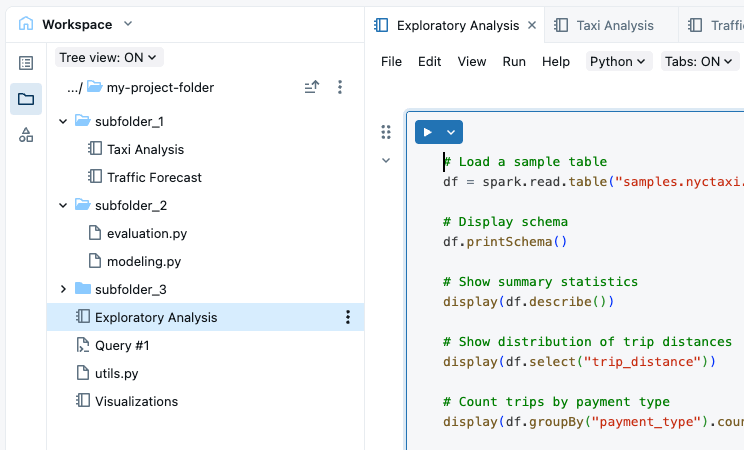
Workspace Browser Tree View
The side panel includes a tree view that provides a flexible, tree-based view of your workspace folder hierarchy with folder expansion and navigation controls. 📖 Documentation
Notebook Tagging
You can apply tags to notebooks to organize and categorize them for easier management, including governance tags for certification and deprecation. 📖 Documentation
Databricks Apps improvements
You can manage Python dependencies using uv with pyproject.toml and uv.lock files. 📖 Documentation
Support for app-to-app communication and table resources that provide governed access to structured data. 📖 Documentation
You can collect traces, logs, and metrics from your apps and persist them to Unity Catalog tables using the OpenTelemetry (OTel) protocol. 📖 Documentation
Databricks Apps Compute sizing Supports all compliance security profile standards with default availability for workspaces with compliance security profile enabled.
Inbound Private Link
Inbound Private link for performance intensive services is Available for services like Zerobus Ingest and Lakebase Autoscaling. 📖 Documentation
Lakebase
Lakebase Autoscaling Enhancements
Added OAuth role management via UI/REST API, budget policies with custom tags, and Lakehouse Sync (Beta) for CDC replication to Unity Catalog.
OAuth roles: Create OAuth roles using the Lakebase UI or REST API, in addition to SQL. 📖Documentation.
Budget policies and tags: Associate a serverless budget policy and add custom tags to your project for cost attribution and tracking. 📖Documentation
Lakehouse sync (Beta): Continuously replicate Lakebase Postgres tables to Unity Catalog Delta tables using CDC. 📖Documentation
Lakebase Autoscaling is available for compliance security profile workspaces with HIPAA, C5, TISAX, or None standards. 📖 Documentation
New Lakebase instances are created as Lakebase Autoscaling projects by default with key capabilities:
💯 Serverless autoscaling and scale to zero
💯 Instant database branching
💯 Point-in-time recovery (instant restore)
💯 Unified governance through Unity Catalog
Automatic failover across availability zones with no connection string changes required. 📖 Documentation
Autoscaling is available in ca-central-1 (Canada), eu-west-2 (London), and sa-east-1 (São Paulo).
You can add Lakebase Autoscaling databases as resources within your Databricks applications. 📖 Documentation
🤖GenAI & ML
Genie Code Launch
Genie Code is your assistant with expanded agentic capabilities for autonomous, multi-step data tasks. Agent mode is GA for data science, engineering, and dashboard authoring. 📖 Documentation
AI Runtime
GPU-enabled serverless compute designed for deep learning workloads, with single-node tasks and distributed training are available. 📖 Documentation
Next-Gen Hosted Models
You can access OpenAI GPT-5.4, GPT-5.4 mini, and GPT-5.4 nano directly as Databricks-hosted models through Foundation Model APIs.
Google Gemini 3.1 Flash Lite is also available for batch inference via AI Functions.
Agent Bricks enhancements
Enhanced the Supervisor Agent with long-running task mode, which automatically breaks complex tasks into multiple request/response cycles using task continuation to avoid timeouts. 📖 Documentation
Supervisor Agent is available in additional regions. Knowledge Assistant is available by default for Enhanced Security and Compliance customers with HIPAA controls.
Classification and Information Extraction are available
Classification: Visual UI for classifying documents into predefined categories. 📖 Documentation
Information Extraction: Visual UI for extracting structured data from documents, PDFS and Images. You can define and refine an extraction schema and preview results. 📖 Documentation
AI_Classify and AI_extract support v2 Signatures
Both functions support new v2 signature with improved quality and performance , greater flexibility and native composability with ai_parse_document
AI_Classify : function classifies text content according to custom labels you provide. You can use simple label names for basic classification, or add label descriptions and instructions to improve accuracy for use cases like customer support routing, document categorization, and content analysis.
AI_extract : function extracts structured data from text and documents according to a schema you provide. You can use simple field names for basic extraction, or define complex schemas with nested objects, arrays, type validation, and field descriptions for business documents like invoices, contracts, and financial filings.
Custom Model Serving Telemetry
You can configure endpoint telemetry to persist logs, traces, and metrics from custom model serving endpoints into Unity Catalog Delta tables using OpenTelemetry. 📖 Documentation
📝AIBI Genie
Inspect : It automatically improves Genie’s accuracy by reviewing the initially generated SQL, authoring smaller SQL statements to verify specific aspects of the query, and generating improved SQL as needed. 📖 Documentation
Conversation sharing: You can share Genie conversations with privacy settings: Private, Reviewable by managers, or Account-wide.
Space management APIs are GA: Create, Update, Get, List, and Trash APIs for Genie spaces are generally available. 📖 Documentation
Benchmark APIs : The run benchmarks and retrieve benchmark results API, 📖 Documentation
Workspace-level color palette: Genie spaces integrate with workspace-level color palettes for consistent branding.
Improved context identification: Genie better identifies context from previous messages for more accurate responses.
Ask Genie to explain chart changes: Users can right-click on bar, line, and area time series visualizations (including multi-series and stacked charts) and ask Genie to explain changes. Genie enters Agent mode to analyze the change and identify top drivers. 📖 Documentation
Genie space descriptions on dashboards: Authors can add descriptions to Genie spaces embedded in dashboards. 📖 Documentation
SQL download settings for full query results: The APIs to download full query results respect workspace-level settings for SQL downloads.
Share Genie space with all account users: The share modal includes an option to share your Genie space with all account users
📊AIBI Dashboard
External user embedding GA: External user embedding for dashboards is generally available. 📖 Documentation
Hide Databricks logo: Option to hide the Databricks logo for embedded dashboards. 📖 Documentation
Mobile-responsive layouts: Dashboards support mobile-responsive layouts for small screens.
Custom email subject lines: Custom email subject lines for dashboard subscriptions.
Custom font selection: Select custom fonts for your dashboards, applied to data point labels.
Accounting-style number formatting: Parentheses formatting for negative numbers.
Individual filter removal: Remove individual filters without resetting all filters.
Waterfall chart faceting: Waterfall charts support faceting.
Pivot table drill-through: Added drill-through functionality for pivot tables.
Right-click explanations: Right-click explanations for time series visualizations.
Dashboard snapshot audit logs: sendDashboardSnapshot events added to audit logs for Slack/Teams subscriptions.
Date filter keyboard input: Fixed date filter keyboard input for relative date ranges.
Point map recentering: Point maps auto-recenter when filters are applied.
Advanced cells in pivot tables: Pivot tables support advanced cells including image, HTML, JSON, and link.
📊Databricks One and Genie Code
Chat in Databricks One : Full-screen unified interface routing questions to relevant Genie spaces or providing direct agentic responses. 📖 Documentation
External data source integration for Chat: Connect Google Drive, SharePoint, or custom MCP servers to conversations for document search capabilities. 📖 Documentation
Account-level Databricks One: Cross-workspace discovery and unified search across your Databricks account.
Genie Code for dashboard authoring: Automates multi-step workflows for dashboard creation and editing using natural language prompts.
Metric views
Metric view lineage highlighting: Hovering over metric views in the lineage panel highlights the visualizations built on those metric views.
Metric views in Excel and Google Sheets: Unity Catalog metric views are supported in Excel and Google Sheets.
🛡️Governance and Data sharing
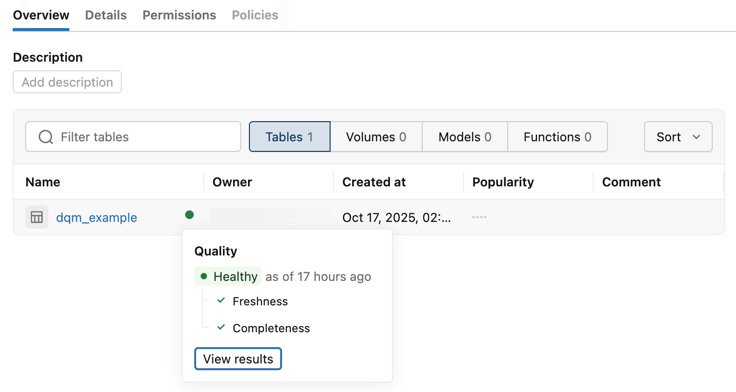
Catalog Explorer Health Indicators
Tables display health indicators showing a summary of each table’s freshness and completeness status based on anomaly detection. 📖 Documentation
ABAC Policy snake_case Naming
ABAC policy tag functions use snake_case naming (has_tag, has_tag_value, has_column_tag, has_column_tag_value), consistent with other Databricks SQL built-in functions. The camelCase forms (hasTag, hasTagValue, hasColumnTag, hasColumnTagValue) continue to work for backward compatibility, but Databricks plans to deprecate their use when creating new policies in the future.
Databricks recommends updating any new policies to use the snake_case forms
CMK for Unity Catalog
You can protect Unity Catalog data with your own encryption keys using customer-managed keys (CMK). 📖 Documentation
Delta sharing Multi Statement transaction support
Delta sharing tables that use pre-signed URLs Cloud Token Sharing modes support Multi-statement transactions.