
🛠️Data Engineering
Column popularity in the catalog explorer
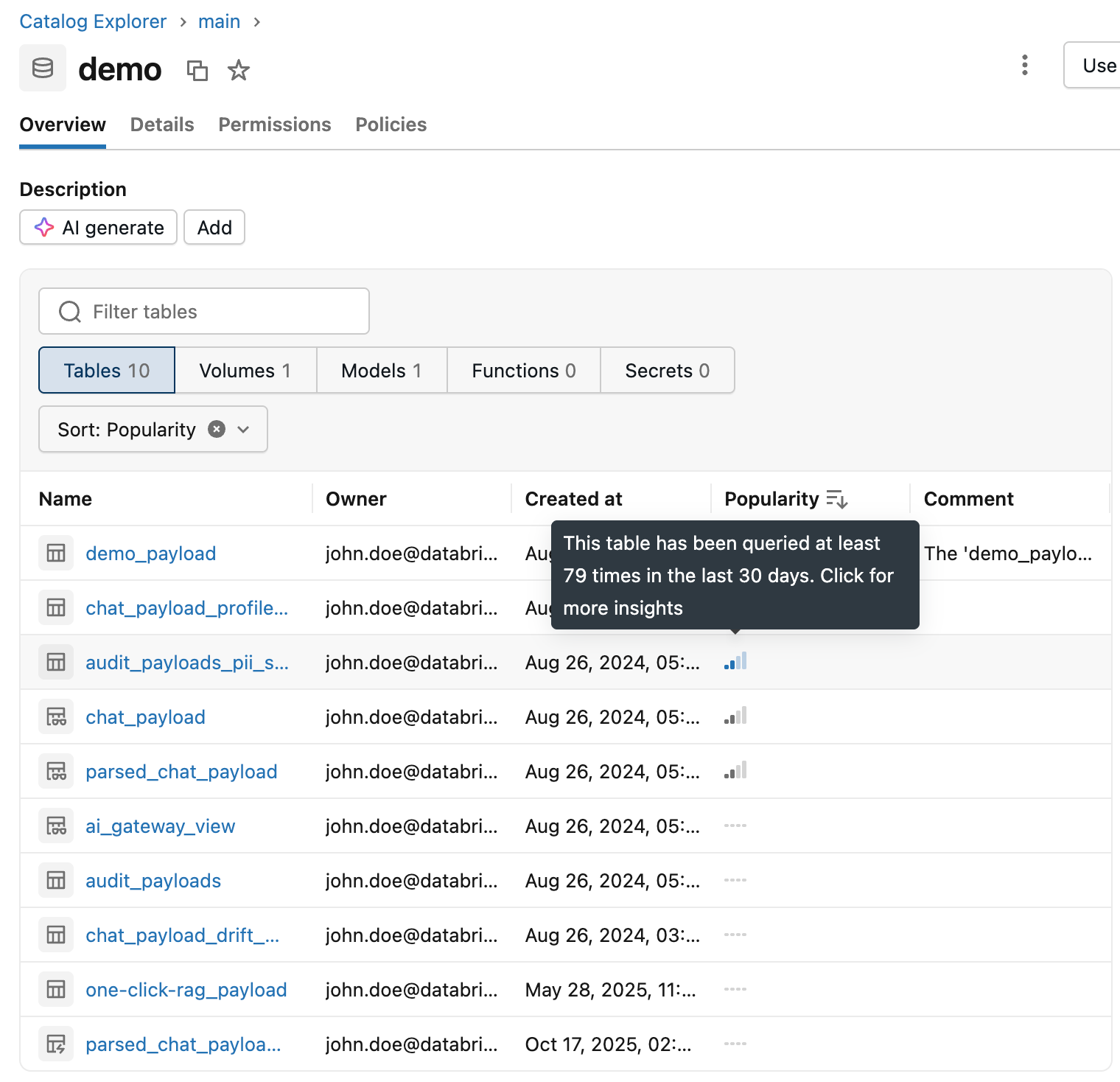
You now have more insights about your tables thanks to the column popularity feature available in the catalog explorer. The Genie Ontology is going to rely on these as well as table insights to determine the ranking of the sources based on OntoRank
New Lakeflow Connectors are available
Slack Access and Integration logs
Managed RabbitMQ
Zip
Workday Reports
Zoom Logs
Pendo
Aha Connector
Zoho Books
Monday.com
Wiz Audit logs
Salesforce Marketing Cloud
Netskope Logs
Square
Sharepoint Connect (Structured file ingestion and file metadata support)
Table updates triggers on Delta Sharing and System tables

You can trigger a job whenever a provider updates a shared table or view or whenever new operational data lands in a system table.This feature supports Databricks-to-Databricks Delta Sharing only table update.
External access for Streaming Tables and Materialized Views
External Delta and Iceberg clients can read Streaming tables and Materialized Views through Unity Catalog and Iceberg Catalog rest APIs without copying the data. 📖 Documentation
Configure the recovery period for dropped managed tables
You can configure the recovery period for Unity Catalog managed tables and set the recovery period to 0 hours or between 7 to 30 days at the catalog or schema level. 📖 Documentation
Comment on Foreign tables
Lakehouse federation can sync table and column comments from supported external data sources to foreign tables in Unity Catalog. It’s important for Genie Ontology.
Lakeflow Pipelines enhancements
You can change the owner of standalone pipeline streaming tables and materialized views.
You can add data quality expectations to materialized views created in Databricks SQL using constraint expectation_name clause.
Parquet v2 for Delta lake tables
Parquet v2 uses advanced encodings, v2 data page headers and INT64 timestamps to improve query performance and reduce table sizes. You can enable it by setting the delta.parquet.format.version table property to 2.12.0 or enable automatic upgrades
Data Warehousing
Lakehouse RT
Lakehouse RT is a serverless SQL warehouse type built for low-latency, high-concurrency workloads, delivering sub-second SQL read queries against Unity Catalog tables. Use it to serve analytical data to applications, run operational analytics and power dashboards for hundreds to thousands of concurrent users. 📖 Documentation
Excel Add-in enhancements
You can use the Add-in to write data from MSFT Excel to a Unity Catalog table by creating a new table or overwriting an existing one without leaving excel.
🖥️ Platform
Run a subset of job tasks with their dependencies
When you run a subset of a job's tasks, you can expand your selection to include each task's dependencies. Add the + modifier to a task key to also run its upstream tasks (+my_task), its downstream tasks (my_task+), or both (+my_task+). Start a partial run from the UI, the REST API, the Databricks CLI, the SDKs or Declarative Automation Bundles. 📖 Documentation.
Automatic identity management for Okta
You can sync users and groups from Okta in Databricks without configuring SCIM provisioning. 📖 Documentation.
Lakehouse Replay
It protects your production environment by automatically testing a sample set of your read-only serverless workloads against upcoming Databricks Runtime releases. It runs entirely in the background with zero setup or maintenance required. Best of all, your data stays securely within your workspace and Databricks covers 100% of the compute costs for the replay. 📖 Documentation.
Schedule deferred policy enforcement for all purpose compute
When you enforce compute policy compliance on out-of-compliance all-purpose compute, you can schedule the configuration update to apply the next time the compute terminates or restarts, instead of restarting it immediately. 📖 Documentation.
Email notifications for expiring SPT
Databricks automatically sends email notifications to workspace admins when a service principal token is within seven days of expiring
You can use OAuth to authenticate Databricks connections in Power Platform
Network policies can be configured to restrict outbound traffic to specific external destinations
You can block internet destinations from serverless workloads through the network policies REST API. Blocked destinations are enforced regardless of the policy’s network access mode. 📖 Documentation.
🤖GenAI & ML
Vector Search has been renamed to AI Search. You can create full text search indexes without any vectors or embeddings needed.
You can enable web search on Supervisor Agent to answer questions that requires information from internet. It returns answers with source citations. Web search is available as a databricks_web_search tool in the supervisor API.
Agent Bricks Supervisor Agent supports Unity Catalog volumes as sub agent tools
AI Search supports query-time options for full-text and hybrid queries: 📖 Documentation
Anthropic Fable 5 and Sonnet 5 are available as a Databricks Hosted Model.
You can use the air Command line interface to submit and manage distributed training workloads on AI Runtime Serverless GPU compute.
Request and response payload are delivered to Unity catalog inference table within seconds.
Omnigent is a coding agent meta-harness that wraps coding agents like Claude Code or Codex. A web UI, persistent and shareable sessions, team collaboration, mobile access, contextual policies, and deployment infrastructure. Swap one line of configuration to switch runtimes while your tools, policies, and prompts stay the same.📖Documentation
You can bring your own Docker container image to AI Runtime CLI workloads.
Managed agent memory gives your AI agents long-term memory across conversations. Memory is stored in Unity Catalog memory stores, governed as Unity Catalog securables and accessed through the Unity Catalog REST API. 📖 Documentation
Lakebase
Starting June 1, 2026, snapshot storage is billable for Lakebase Autoscaling. Snapshot storage size is shown on the Backup & Restore page.
Lakebase Autoscaling now supports Postgres 18.
📝Genie Agents
Databricks Genie App for Teams: 📖Documentation
Databricks Genie App for Slack: 📖Documentation
Genie Chat prompt monitoring: Prompts and responses initiated by Genie Chat are visible in Genie Agents monitoring. 📖Documentation
Knowledge store edit confirmation dialog: A confirmation dialog appears before an author removes a table that has knowledge store edits. 📖Documentation
Delete conversations: Users with CAN MANAGE permission can delete the conversations of other users from the UI. 📖Delete a conversation
Embed Genie Agent as an iframe:📖Embed a Genie Agent in an external app.
Save visualizations to a dashboard: You can save Genie Agent visualization outputs to a dashboard. 📖Save a visualization to a dashboard.
Reference previous visualizations: Select and reference visualizations from previous prompts in follow-up prompts.
Genie Code for metric view export: Use Genie Code when exporting metric views from a Genie Agent to refine the metric view definition. 📖Documentation
Deploy Genie Agents as Declarative Automation Bundles resources:📖Documentation
📊AIBI Dashboard
Dynamic annotation lines: Annotation lines can be driven by data or a calculation instead of a fixed value, letting you show running averages, variable thresholds, or anomaly markers that update with your data. 📖Documentation
Six new preset themes are available for AI/BI dashboards for more ready-made options without creating a custom theme. 📖 Documentation
Table header color customization: Authors can set font color, background color, and text formatting for table column headers. 📖Documentation
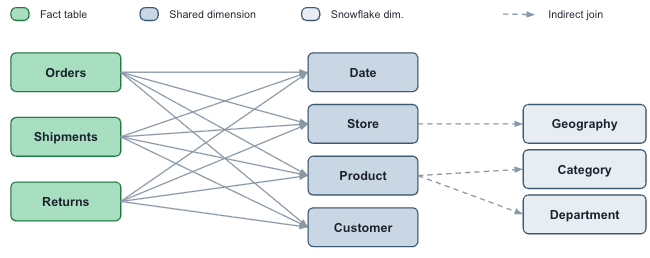
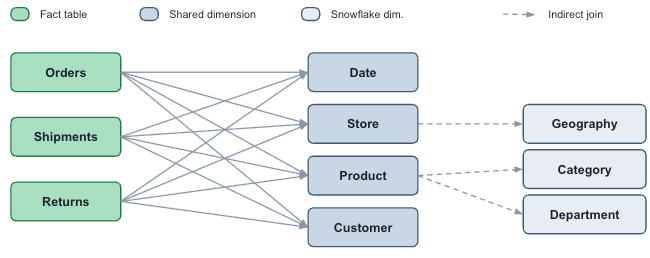
Dashboard relationships allow users to create complex multi-fact data models. 📖 Documentation
Local metric view parameters: Local metric views support parameters, allowing Databricks to dynamically change query inputs based on user selections in a UI. 📖Documentation
Local metric view wildcard expressions: Local metric views support wildcard expressions, which allows users to inherit all fields from upstream tables or metric views.
Bookmark filter combinations: Dashboard authors can save filter combinations as shared bookmarks, which viewers can quickly apply. 📖Documentation
Pivot table column improvements: Pivot table columns can expand and collapse. 📖Documentation
Theme customization enhancements: New theme customization options are available, including the ability to change axis and grid line colors, adjust widget layout and apply a color ramp. 📖Documentation
New Workspace theme settings are available and automatically apply to new dashboards. 📖Documentation
Dashboard variables: Dashboard authors can create dashboard variables that allow viewers to swap fields on visualizations. 📖 Documentation
Customizable table headers: Dashboard authors can customize table column headers. 📖Documentation
Widget-level color gradient: You can derive a color gradient from the visualization color at the widget level, matching the behavior available in theme settings.
Gantt charts now available: Gantt charts display tasks as horizontal bars on a continuous axis to visualize project schedules, manufacturing workflows, and other time-ranged events. Each bar requires matching start and end field types (date, datetime, or numeric). 📖Documentation
Custom visualizations: Build custom charts with the Vega-Lite library for customization beyond the built-in visualization types. 📖Documentation
Per-category font customization: You can customize fonts per category across all visualization types. 📖Documentation
Table row cross-filtering and drill-through: Select table rows to cross-filter, or right-click to drill through. 📖Documentation
Cross-filtering and drill-through: Line, combo, and area charts support cross-filtering and drill-through filters. 📖Documentation
Dashboard details in draft mode: Draft mode shows dashboard details, making it easier to find dashboard managers and the dashboard’s location.
New metric view low-code editor syntax : The following syntax is available in the metric view low-code editor:
JOIN … RELYWINDOW OFFSETWINDOW INCLUSIVITY
📊Genie Code
Genie Code space authoring skills: Genie Code includes dedicated skills for authoring and maintaining Genie Agents.
Power BI enhanced report format support: Genie Code supports Power BI files exported with the Power BI enhanced report format (PBIR). 📖Documentation
Image upload suggestions for Power BI and Tableau imports: Genie Code suggests that authors upload images when importing files from Power BI and Tableau to improve migration quality.
Genie Code metric view usage: Genie Code relies more heavily on Unity Catalog metric views rather than creating local ones.
The full page experience is a command center for Genie Code, where the active thread is shown prominently, surfacing assets like notebooks and files alongside it as tabs when needed. You can run multiple threads in parallel, switch between them easily, and easily personalize Genie Code with skills, instructions, and MCP servers.
Genie Code offers an auto-approve mode that approves tool actions. An AI classifier reviews each action and blocks risky ones. Databricks recommends keeping it off when working with production data or shared resources. 📖 Documentation
Genie One
Genie has been renamed to Genie One.
You can connect Genie to Microsoft Copilot Cowork.📖Documentation
Share chats with account users: You can share Genie One chats with all users in your account as read-only. 📖Documentation
New external source connections (Beta): Chat in Genie One supports connecting to Gmail and additional Microsoft 365 apps. 📖Documentation
Scheduled task email prefix: Scheduled task notification emails use the prefix “Genie Task:” instead of “Task update:”.
Scheduled tasks for consumer entitlement users: Consumer entitlement users can now create scheduled tasks without needing the SQL entitlement. 📖Documentation
Account-level Genie customization: You can customize Genie at the account level, including colors, a logo, a markdown welcome message and pinned content. 📖Documentation
Email tool for scheduled tasks: Scheduled tasks use an email tool to send emails, enabling more customized email formats and send conditions. 📖 Documentation
Workspace-level Genie One customization: Workspace admins can customize Genie One at the workspace level. Under workspace settings, admins can configure colors, a logo, a markdown welcome message, and pinned content. 📖 Documentation
Certified object prioritization: Chat in Genie One acknowledges and prioritizes certified objects.
User skills : You can create personal user skills to extend chat in Genie One with custom capabilities. A skill is a repeatable task you teach Genie One once and run whenever you need it, such as building your weekly metrics report. 📖Documentation
Rich output : Genie One responses for non-SQL answers, such as search results and MCP reads, can now include rich HTML, CSS, and JavaScript content, enabling more varied data presentations beyond plain prose.
Genie Ontology Genie One automatically builds and maintains a map of your business by extracting and ranking knowledge from sources such as dashboards, notebooks, and pipelines, improving response accuracy and reducing latency. 📖 Documentation
Compliance security profile iframe embed: Customers with compliance security profile enabled can enable embedding Genie Spaces as an iframe. 📖 Documentation
You can use the Databricks Genie mobile app to access Genie One from iOS and Android devices.📖Documentation
Metric views
Median and percentile expressions in metric views: Low-code metric view building supports two new expression types: median and percentile.📖 Documentation
You can define parameters in metric views to bind values at query time, serving many query variants from a single definition instead of maintaining a separate metric view per variant. 📖Documentation
🛡️Governance and Sharing
Govern the access to Foundation Models with Unity Catalog
Admins can grant permissions on the system.ai to control which models your users can access. The permission are enforced across pay per token, provisioned throughput and batch ai functions workloads.
Delta Sharing is now OpenSharing which is the new open standard for sharing data and AI assets across platforms and organization
ABAC grant policies for models
A GRANT policy can grant the EXECUTE privilege on models, attached at the catalog or schema level. Both customer-registered MLflow models and Databricks-hosted foundation models in system.ai are supported. 📖 Documentation
OIDC supported for sharing to iceberg clients
You can use an Iceberg REST Catalog client such as Snowflake or OSS Spark to read OpenSharing shares secured with OpenID Connect (OIDC) federation.
Share data behind a firewall with SecureConnect
Providers can use Opensharing SecureConnect to share data from Cloud storage behind a firewall or private endpoint without adding each recipient’s network to an allow list. 📖Documentation
Share Genie Agents externally using OpenSharing
Providers can share Genie Agents with users using OpenSharing. Databricks creates a point-in-time snapshot of the space's data assets and instructions. 📖Documentation
Access requests across Unity Catalog metastore
You can enable access requests at the UC metastore level.
Discover page is available
Discover is a browsing experience that help users find the right assets without the need of a deep knowledge. It’s an easy way to organize tables, dashboards, Genie Agents by business area.
Govern LLMs in Unity Catalog with Model Services
A model service is a Unity Catalog securable that represents a governed LLM endpoint, so you can define an endpoint once and share it across workspaces using Unity Catalog privileges, instead of duplicating endpoints per workspace.📖 Documentation.