
Curated hands‑on resources to master Databricks. Check it now
February 2026 Release Highlights
Anthropic Claude 4.6 and Gemini 3.1 Pro are available as Databricks-hosted models.
Auto Loader now uses file events by default and JAR tasks can run on Serverless compute.
Integrated Python unit testing (pytest) is available directly in the workspace.
✨Tips and Tricks
AI Dev Kit gives your AI Coding Assistant the trusted sources it needs to build faster and smarter on Databricks
🛠️Data Engineering
Apply filters, masks, tags a comments to pipeline created datasets
Using create or alter or the Lakeflow UI to modify ETL and ingestion pipelines you can modify pipelines to apply row filters, column masks, table and column tags, column comments, and (for materialized views only) table comments.
Auto Loader File Events by Default
To reduce costs and listing latency, Auto Loader now defaults to file events when loading from external locations where events are enabled. 📖 Documentation
Optimized Writes for UC CRTAS
Partitioned Unity Catalog tables created via CREATE OR REPLACE TABLE AS SELECT now have Optimized Writes enabled by default, resulting in more efficient files. 📖 Documentation
Schema Evolution in SQL INSERT
You can use the WITH SCHEMA EVOLUTION clause with SQL INSERT statements to automatically update target Delta tables. 📖 Documentation
Automatic Streaming Type Widening
Streaming reads on Delta tables automatically handle column type widening.
Unity Catalog Volume Checkpoints
DataFrame checkpoints support Unity Catalog volume paths, simplifying state management. 📖 Documentation
JAR Tasks on Serverless
You can run JAR-based Spark jobs on serverless compute, eliminating cluster management for JVM workloads.📖 Documentation
New Lakeflow Connectors
Native ingestion is now for TikTok Ads, HubSpot, Google Ads, and Zendesk.
Serverless
Serverless improvements in version 5
Serverless JAR jobs are supported
Arrow optimization is enabled by default for Python UDFs, significantly improving UDF execution performance
Data Warehousing
Set a default SQL Warehouse
Workspace administrators can set a default SQL warehouse that is automatically selected in SQL authoring surfaces, including the SQL editor, AI/BI dashboards, AI/BI Genie, Alerts, and Catalog Explorer.
Individual users can also override the workspace default by setting their own user-level default warehouse.
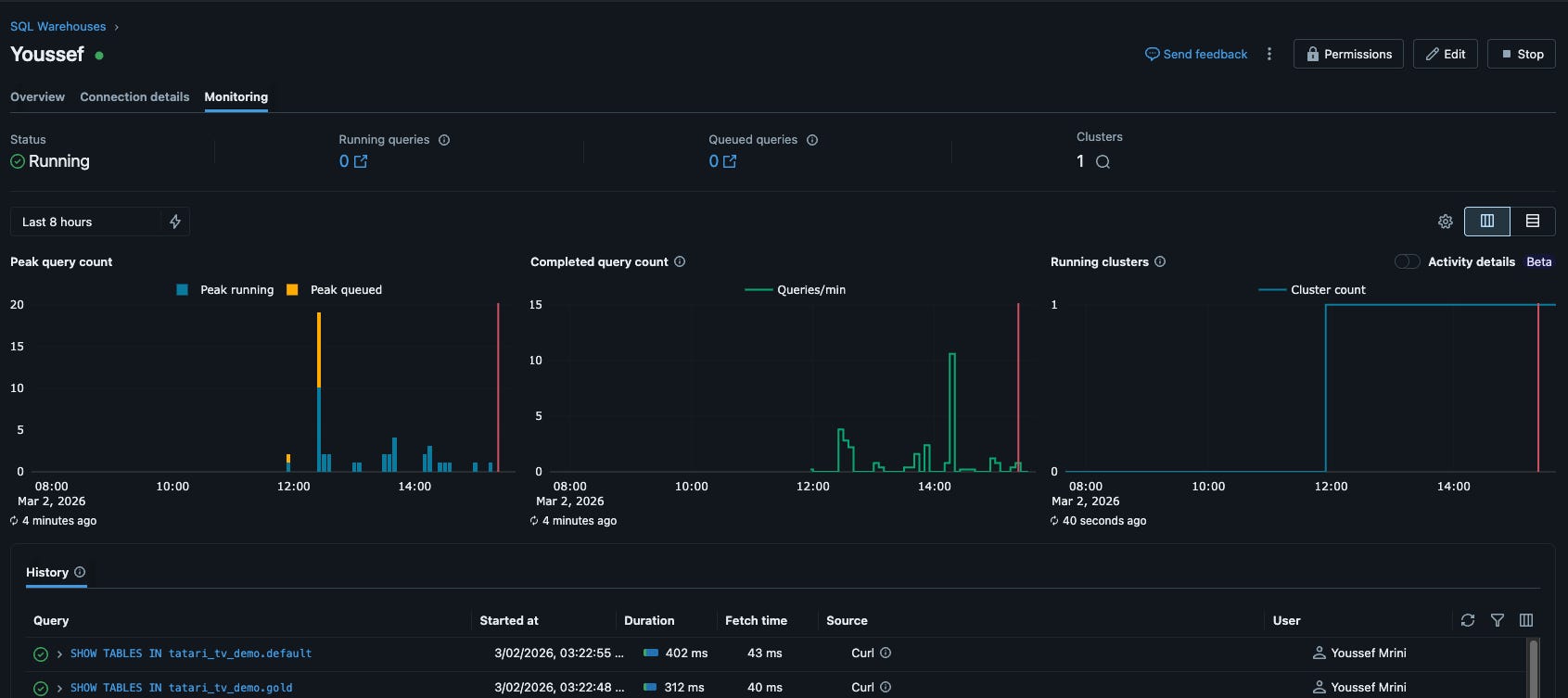
View Warehouse activity details
You can view detailed annotations on the Running clusters chart in the SQL warehouse monitoring UI to understand why warehouses remain active. The Activity details toggle displays color-coded bars that show query activity, fetching queries, open sessions, and idle states. Hover over bars to see metadata, or click on fetching activity to filter the query history table. 📖 Documentation
SQL Scripting & Cursors
A massive win for SQL developers. Beyond basic scripting, compound statements now support SQL Cursors for row-by-row processing. 📖 Documentation
Query Tags for SQL Warehouse
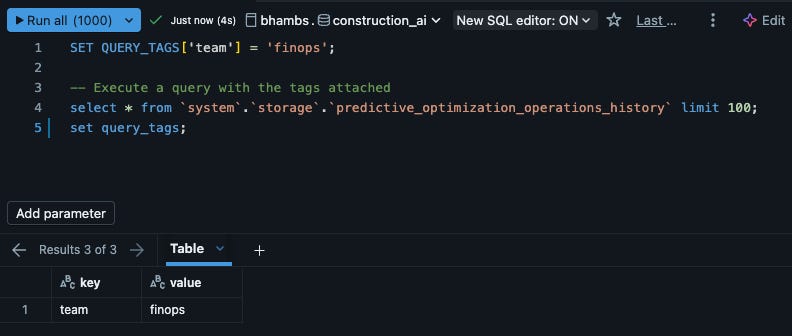
You can apply custom key-value tags to SQL workloads on Databricks SQL warehouses for grouping, filtering, and cost attribution.
Query tags appear in the system.query.history table and on the Query History page of the Databricks UI, allowing you to attribute warehouse costs by business context and identify sources of long-running queries.
Tags can be set using session configuration parameters, the SET QUERY_TAGS SQL statement, or through connectors including dbt, Power BI, Tableau, Python, Node.js, Go, JDBC, and ODBC. 📖Documentation
.
Advanced Sketch Functions
New statistical power arrives with Approximate Top-K sketches and Tuple sketches for high-performance distinct counting. 📖 Documentation
Behavioral Change - Timestamp Partitions
Partition values use the Spark session timezone instead of the JVM timezone. If you have partitions written prior to Runtime 18.0, run SHOW PARTITIONS to verify metadata before writing new data.
DESCRIBE FLOW
Describe flow is a reserved command. If you have a table named flow, you must now use backticks (`flow`) to describe it.
Smart SQL Performance
SQL commands (like SHOW TABLES) no longer re-run when calling .cache() on the result DataFrame.
🤖GenAI & ML
Next-Gen Hosted Models
You can access OpenAI’s GPT-5.3 Codex, Qwen3 and Google Gemini 3.1 Pro directly as Databricks-hosted models and the latest reasoning models from Anthropic, Claude 4.6 Sonnet and Opus are available for pay-per-token serving.
Agent Bricks - Supervisor Agent
Orchestrating multi-agent systems is simpler and more reliable.📖 Documentation
AI Gateway
Manage and govern access to external LLM providers with the new AI Gateway, providing centralized rate-limiting and security. 📖 Documentation
🛡️Governance & Security
Delta Sharing Multi-Statement Transactions
Shared tables using pre-signed URLs now support multi-statement transactions, pinning the table version for consistent reads across a session. 📖 Documentation
Global Compliance Expansion
Databricks supports ISMAP compliance (Japan) and HITRUST compliance controls
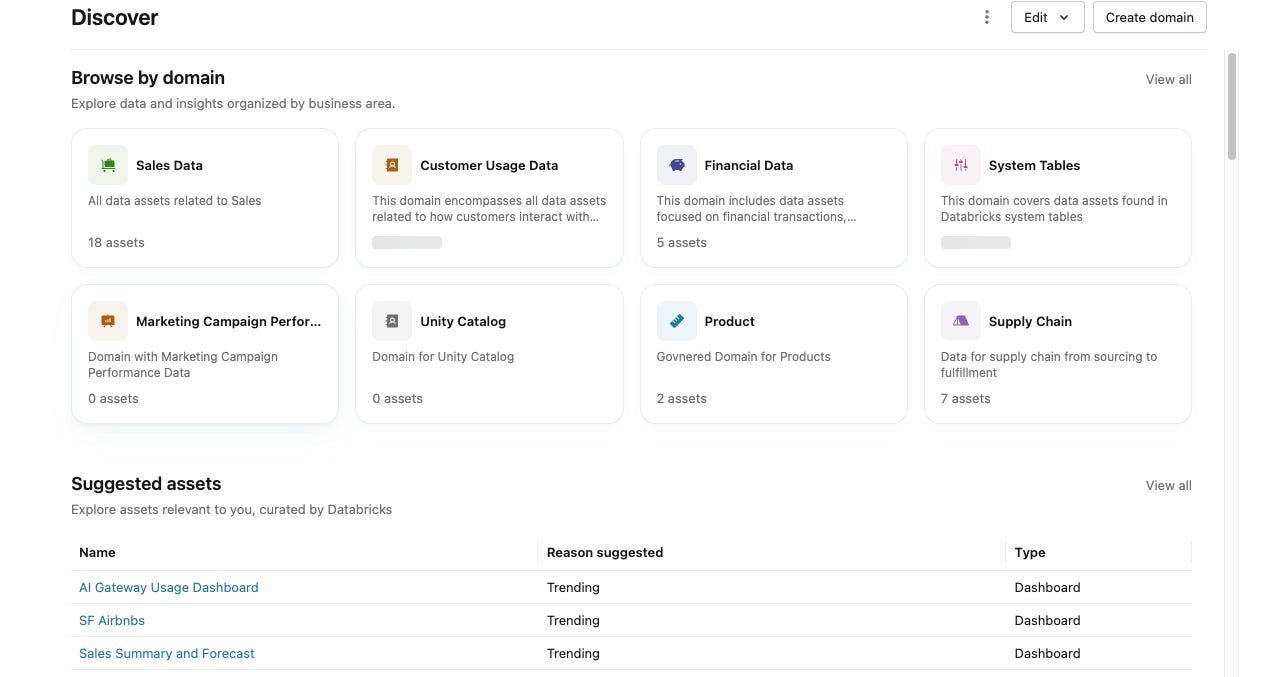
Discover page and domains
The Discover page provides a centralized interface for searching, browsing, and previewing data assets governed by Unity Catalog. This Beta release introduces:
Domains: Business-aligned organization layer that groups data assets by functional area (for example, Marketing, or Finance) to improve discovery and stewardship
Custom curation: Curators can customize and highlight specific assets in their organization or domain
AI-powered recommendations: Surface popular and valuable datasets to enable curation at scale
Unified discovery: Access tables, dashboards, Genie spaces, and more in one place
Domains are built on governed tags, allowing you to organize data assets in a way that’s best suited for your business needs.
Resilient PAT Management
Revoking a user’s permissions now preserves their Personal Access Tokens in an inactive state, allowing for easy recovery. 📖 Documentation
🖥️Platform
Python Unit Testing in the Workspace
Professional engineering comes to the notebook. You can discover and run pytest-based tests using a dedicated sidebar and inline UI. 📖 Documentation
Deploy Apps from Git
Streamline your app lifecycle by deploying Databricks Apps directly from Git repositories. 📖 Documentation
Assistant + MCP Servers
You can connect Databricks Assistant to Model Context Protocol (MCP) servers, allowing it to interact with local tools securely. 📖 Documentation
ADBC Default for Power BI
For faster data transfer, new Power BI connections now use the ADBC driver by default. 📖 Documentation
Lakehouse federation updates
Support added for the DATETIMEOFFSET data type in Synapse, and BigQuery table descriptions are exposed as table comments.
Google Sheets Pivot Tables
Business users can create pivot tables in Google Sheets directly from Databricks tables. 📖 Documentation
📊AIBI Dashboard
Unity Catalog metric view lineage: Dashboard info shows Unity Catalog metric views in the lineage section.
Dashboard refresh cancellation: Cancelling a dashboard refresh shows the last available data instead of an error.
DD-MM-YYYYdate format: TheDD-MM-YYYYdate format is available for date fields.Date range parameter “All” selection: Date range parameters support All. When All is selected, the parameter value is
nulland all rows are returned. 📖 DocumentationGenie agentic experience (Public Preview): Genie for dashboard insights offers an agentic experience.
Pivot table hierarchies: You can expand and collapse hierarchies in pivot tables.
Stacked bar chart labels: Stacked bar charts support showing min/max label values and total labels.
Area and line chart sorting: Area and line charts support sorting axes by measures.
Dashboard content search: Global search in Lakehouse and Databricks One now matches on dashboard content, not just titles.
Workspace admin theme permissions: Fixed a bug where workspace admins couldn’t edit workspace-level themes.
Level of detail calculations: Level of detail calculations now support
EXCLUDEsyntax on multiple fields. 📖 DocumentationColor legend sorting: You can sort color legends by another field in visualizations.
Pivot table cell styles: Pivot tables support HTML, JSON, and image cell styles.
Pivot table cross filtering: Pivot tables support cross filtering.
Table resizing: You can resize table and pivot table headers and columns.
Histogram and funnel chart labels: Histogram and funnel charts can show “total” labels.
Assistant for dashboard authoring improvements: Assistant for dashboard authoring supports creating labels and setting color encoding values.
Multi-select parameter enhancement: Multi-select parameters support selecting all values. 📖 Documentation
Dashboard grid expansion: Dashboard layouts in the canvas support 12 columns across instead of 6, providing more flexibility for widget placement.
Parameterized dashboard tasks: Dashboard tasks in Jobs can be parameterized, allowing job parameters to dynamically set dashboard filter values at runtime.
Workspace-level dashboard themes: Dashboard themes can be configured at the workspace level. 📖 Documentation
Top-aligned text widgets: Text widgets default to top-aligned text.
Refresh-only schedules for individual data permissions: Authors and viewers of dashboards published with individual data permissions can create refresh-only schedules that trigger cache refreshes without sending notifications, improving dashboard load times. 📖 Documentation
Tag search: Tag search is supported for dashboards, allowing users to find dashboards by their assigned tags.
Assistant for dashboard authoring: Authors can automate multi-step dashboard workflows using natural language prompts to create datasets, visualizations, layouts, and filters. 📖 Documentation
📝AIBI Genie
Metric view display names: Genie uses metric view display names and display formats for query result tables.
Automatic JOIN relationships: Creating and updating Genie spaces using the API automatically creates JOIN relationships based on the primary and foreign keys defined in source tables.
Context tab for space consumers: A new Context tab is available for Genie space consumers with CAN VIEW or CAN RUN permissions. Consumers can view the space description and common questions at any point during their Genie interactions. 📖 Documentation
Agent mode thinking traces: Agent mode streams thinking traces in-line for improved readability.
Agent mode parallel queries: Agent mode runs queries in parallel for faster results.
Research Agent renamed to Agent mode (Beta): The rename better aligns with the feature’s function. 📖 Documentation
Improved Agent mode (Beta) responses: Agent mode produces more concise and faster responses for “what” type questions through improved system prompting.
Heatmap and sankey visualizations: You can generate heatmap and sankey visualizations in Genie.
Query tagging for benchmarks: In query history, Genie attaches query tags to queries generated from benchmarks, helping you differentiate workloads from end users versus benchmarks.
Auto-generated space titles: Space titles automatically generate based on the context of selected tables.
Persistent knowledge store suggestions: Knowledge store suggestions persist on messages so you can navigate to other tabs within Genie before returning and accepting suggestions.
Knowledge store suggestions on download: Genie suggests adding query results to the knowledge store when you download them.
Inspect mode: It automatically improves standard Genie’s accuracy by reviewing the initially generated SQL, authoring smaller SQL statements to verify specific aspects of the query, and generating improved SQL as needed. 📖 Documentation
Increased table limit: The table limit for Genie spaces has been increased from 25 to 30 tables.
Embedded compute credentials: Compute credentials are embedded for all users of a Genie space. These credentials are embedded when a Genie space author changes the attached warehouse in the Genie space.
Tag search: Tag search is supported for Genie spaces, allowing users to find spaces by their assigned tags.