
April 2026 Release Highlights
Databricks One has been renamed to Genie
Lakeflow Designer is available to all Databricks Users
✨Tips and Tricks
Genie Code is an autonomous AI partner for data work in Databricks, deeply integrated with Unity Catalog so it understands tables, columns, lineage, and governance. It can explore data, train models, build pipelines, and create dashboards across notebooks Lakeflow, SQL, and dashboards. It also helps debug and maintain production systems including pipeline failures and GenAI app observability with support for external workflows via MCP
🛠️Data Engineering
Query-based connectors in Lakeflow Connect are available
Query-based connectors ingest data from databases by querying the source directly using a cursor column, without requiring change data capture (CDC) configuration or an ingestion gateway.
The supported sources include Oracle, Teradata, SQL Server, MySQL, MariaDB, and PostgreSQL, as well as all Lakehouse Federation data sources using foreign catalog ingestion. 📖 Documentation
Create and write to Unity Catalog from External Delta Clients
The Unity REST API supports write and create access to Unity Catalog external and managed Delta tables from external Delta clients such as Apache Spark.
External Delta tables support full read, write, and create operations.
Prerequisite: Creating and writing to Unity Catalog managed Delta tables requires catalog-managed commits to be enabled.
Lakeflow Designer is available to all Databricks Users
Lakeflow Designer is a visual, no-code, AI-native experience for data preparation and analytics. It lets users prepare and explore data through a drag-and-drop canvas and natural language.
Spark declarative Pipelines updates history is retained for 60 days
Lakeflow Spark Declarative Pipelines update history is retained for 60 days, up from 30 days. The extended retention applies to updates shown in the pipeline UI and returned by the Pipelines REST API. 📖 Documentation
Disable a task in Databricks Lakeflow Job
You can disable a task in a Databricks Lakeflow job to skip it at run time without removing it from the job. Disabled tasks keep their configuration and run history, so you can re-enable them later without rebuilding the task. 📖 Documentation
"Useful for temporarily skipping a downstream notification or expensive aggregation without modifying job definitions in source control."
NullType Void support in Delta Tables (DBR 18.2+)
Delta Lake tables support VOID columns. Previously, VOID columns were silently skipped by path-based DataFrame reads
Optimized writes for partitioned Unity Catalog tables created with CRTAS (DBR 18.2+)
Optimized writes are applied to partitioned Unity Catalog tables created with CREATE OR REPLACE TABLE ... AS SELECT (CRTAS).
Pyspark.pipelines.testing namespace alias (DBR 18.2+)
pyspark.pipelines.testing is available as a convenience alias for dlt.testing APIs. Import Lakeflow Spark Declarative Pipelines pipeline testing utilities through either namespace.
Improved auto loader listing perf (DBR 18.2+)
Auto Loader uses a more efficient listing method that improves listing speed for cloud storage sources.
Delta Table history includes write option flags (DBR 18.2+)
Delta table history (DESCRIBE HISTORY) includes write option flags in the operationParameters column for WRITE and REPLACE TABLE operations.
Selectively replace data with replaceOn and replaceUsing Dataframe APIs (DBR 18.2+)
Use these options to replace part of the table with the result of a DataFrame. replaceOn replaces rows that match a user-defined condition. replaceUsing replaces rows where specified columns are equal. These APIs complement the INSERT REPLACE ON and INSERT REPLACE USING SQL statements.
Data Warehousing
Google Sheets connector is GA
You can use the connector to import and query Unity Catalog data. 📖 Documentation
You can bring Governed Lakehouse data to Excel Sheets
The Databricks Excel Add-in connects your Databricks workspace to Microsoft Excel, bringing data directly into your spreadsheets to help you move from data to decisions faster. The add-in is fully supported across Excel for the web and desktop versions for both Windows and macOS. 📖 Documentation
You can configure 5X-Large Cluster for Serverless and SQL Pro
The 5X-Large size provides 512 workers. Workspace admins can control access to this feature from the Previews page.
Create or replace support for temporary tables
CREATE OR REPLACE TEMP TABLE syntax is supported, allowing you to create or replace temporary tables in a single statement. This eliminates the need to explicitly drop and recreate temporary tables.
🖥️ Platform
Git-backed app deployments are GA
You can deploy Apps from Git repos. You only need to configure a git reference 📖 Documentation
You can connect Lovable to Databricks
You can connect Lovable-hosted apps to your Databricks workspace to query lakehouse data using the REST API and OAuth machine-to-machine authentication
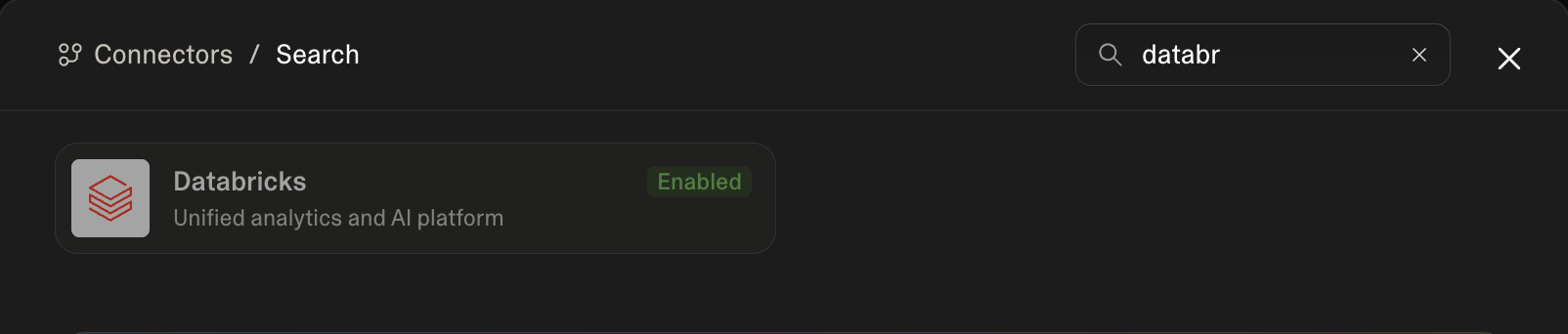
"why": vibe-coded UIs on top of governed Lakehouse data without leaving Databricks auth/audit.
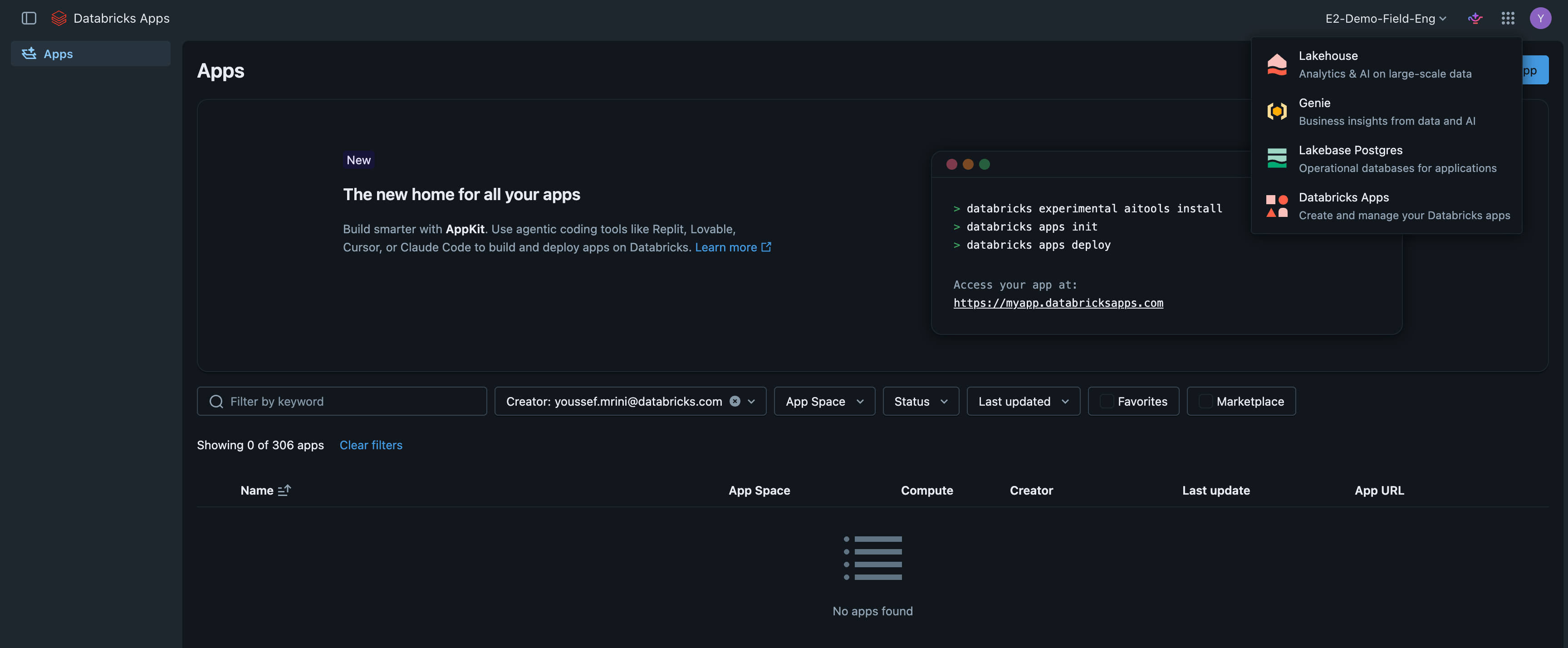
New Databricks Apps Interface
The Databricks Apps console has a redesigned interface that provides a more intuitive app management experience. The updated console streamlines workflows for editing, deploying, and monitoring apps.
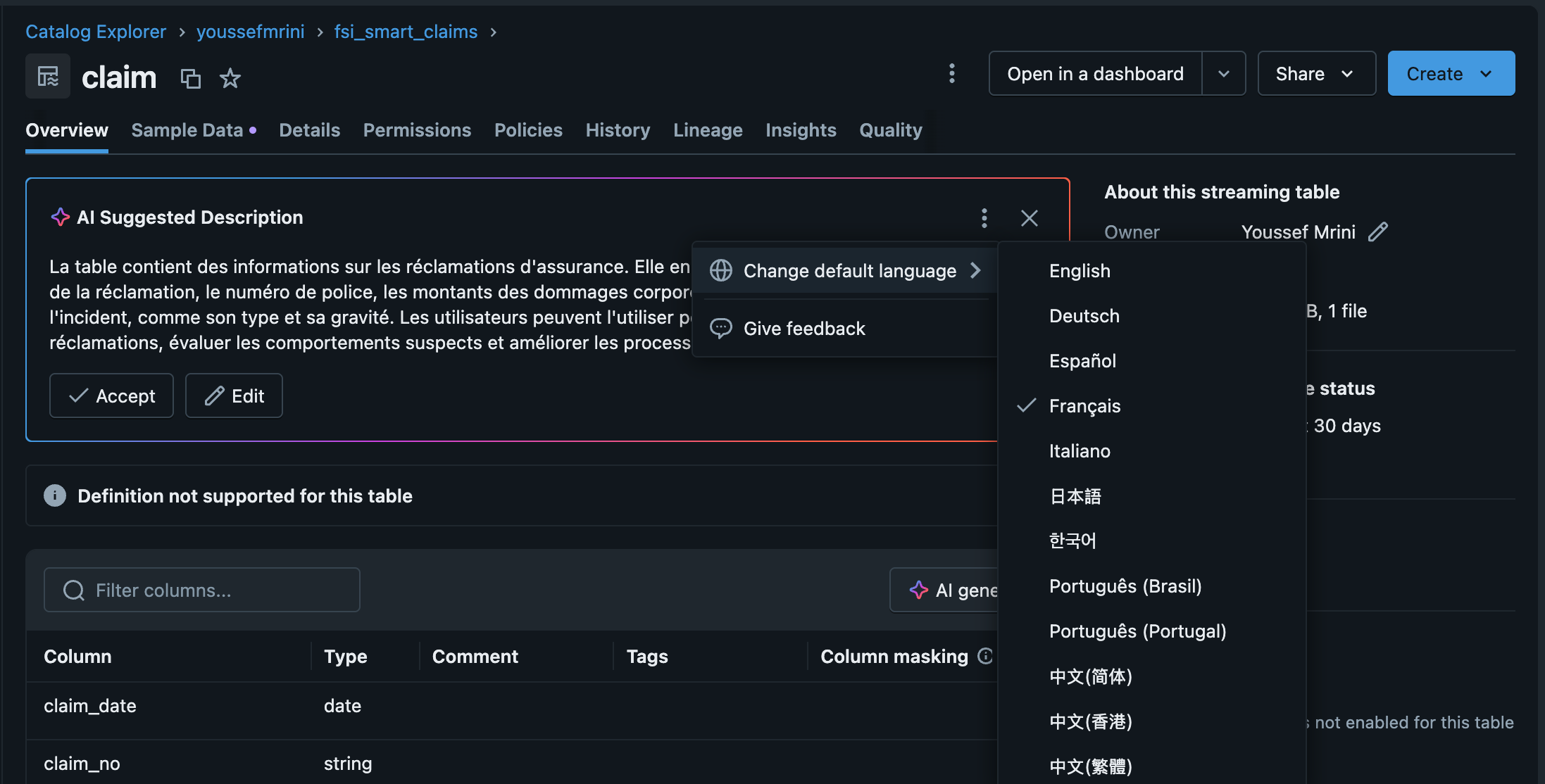
Language selector for AI generated comments
You can change the default language for AI-generated comments in Catalog Explorer. Your selection is saved in your browser's local storage and applies to all subsequent AI-generated comment requests across all supported entity types. 📖Documentation
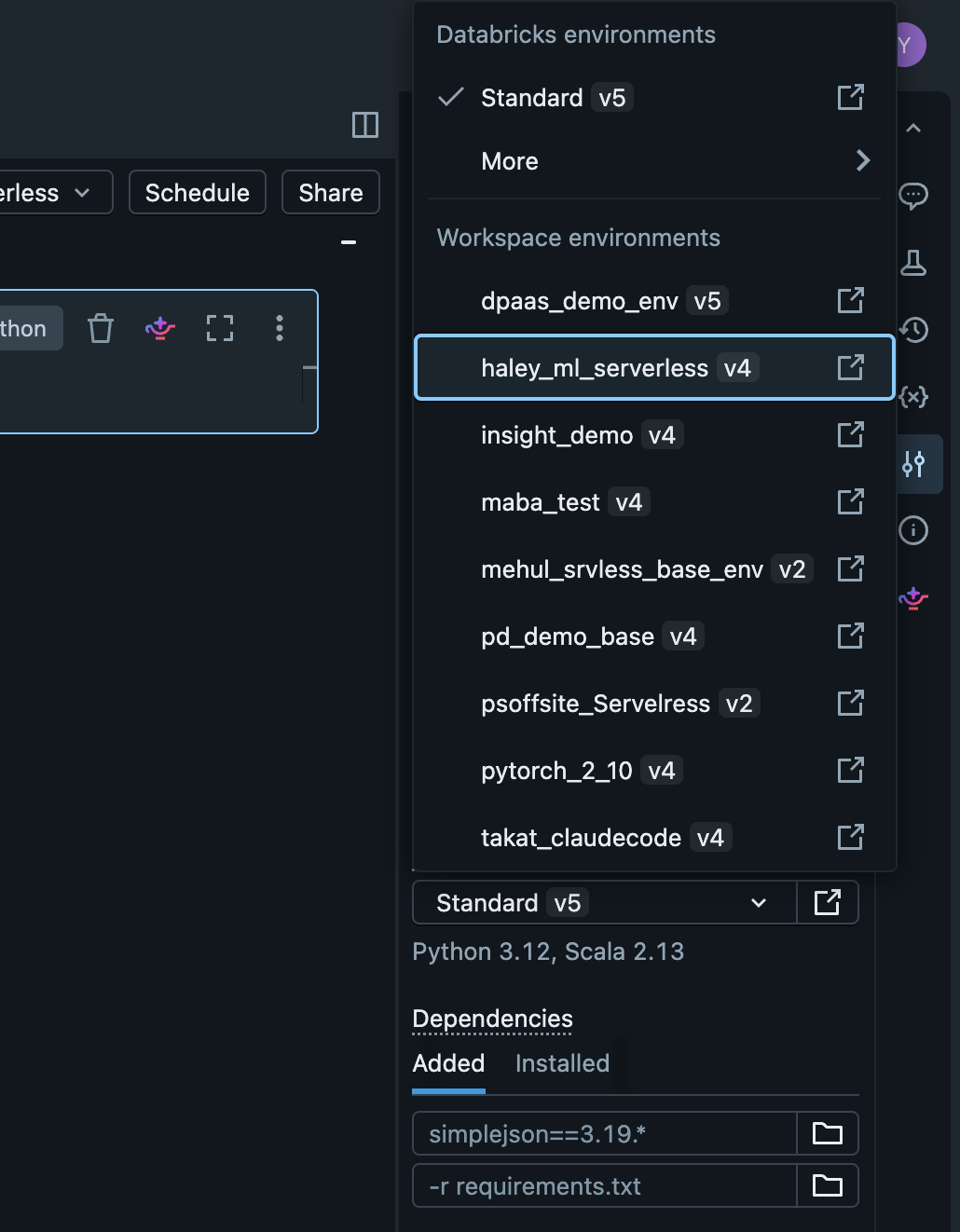
Workspace base environments are GA
Workspace base environments let workspace admins create and manage pre-built, cached environments for serverless notebooks.
Lakebase
Lakebase Autoscaling Enhancements
Lakehouse sync (Beta): Continuously replicate Lakebase Postgres tables to Unity Catalog Delta tables using CDC. 📖Documentation
You can manage encrypted Lakebase Autoscaling project data using a customer-managed key (CMK) from your own cloud KMS. This gives your organization full control over encryption and helps meet regulatory and compliance requirements. 📖Documentation
You can export Lakebase Postgres metrics and logs to any OTLP-compatible observability backend. You can configure the endpoint, authentication, and resource attributes from the Lakebase App. 📖Documentation
🤖GenAI & ML
AI_Prep_search() is available
It transforms the structured output of ai_parse_document into search ready chunks optimized for Vector Search and RAG 📖 Documentation
AI_Parse_document() is GA
This function parses structured content from unstructured documents including PDFs, images, Word documents, and PowerPoint files.
For now: documents are limited to a maximum of 500 pages and 100 MB.
Vector Search Retrieval Quality
Mosaic AI Vector Search provides built-in retrieval quality evaluation that measures and compares the relevance of different search strategies on your data. 📖 Documentation
CMK is supported on Mosaic Model Serving
You can use customer-managed keys to encrypt model serving container images and model artifacts stored in Databricks managed registry. Endpoint artifacts created after April 16, 2026 are protected with customer-managed keys
Next-Gen hosted models
You can access Anthropic Claude Opus 4.7, GPT-5.5 and GPT5-5 Pro as a Databricks Hosted models through Foundation Model APIs.
Supervisor API for building agents (Beta)
The Supervisor API lets you build agents in a single API call. Define your model, tools, and instructions, and Databricks handles tool selection, execution, and response synthesis.📖 Documentation
Data Classification is GA
Use Data Classification to automatically classify and tag sensitive data in Unity Catalog using an agentic AI system. 📖 Documentation
CPU_MEDIUM and CPU_LARGE workload type for Model Serving (Beta)
These workload types let you trade concurrency for more memory per worker on the same CPU hardware. Use them when your model needs more memory than the standard CPU workload type provides.
AI Runtime supports the 1xH100 acceleration
It’s designed for workloads that need more GPU memory than 1xA10 provides but do not require multi-GPU distributed training, such as fine-tuning medium-size language models
Manage Supervisor Agent Programmatically with the Databricks SDK (Beta)
You can use the Databricks SDK for Python to create and manage Supervisor Agent and their tools. 📖 Documentation
Data Quality monitoring improvement
The Data Quality Monitoring dashboard includes a Recently Resolved Incidents section. This section shows tables that were previously unhealthy but have since automatically recovered to a healthy status, including the time of resolution. 📖 Documentation
Agent bricks supervisor agent supports custom MCP servers and custom agents on databricks Apps
You can add custom MCP servers and custom agents hosted in Databricks Apps as subagents in your Supervisor Agent. 📖 Documentation
📝AIBI Genie
Weekly digest and monitoring: The Monitoring tab includes a Weekly digest section showing weekly messages, users, and thumbs up/down feedback. Authors can also use Genie Code to summarize top usage trends and common issues from the monitoring page.
PDF file uploads: Upload PDF files directly into a Genie Space to analyze their content using natural language. 📖 Documentation
Databricks Apps search: You can search for Databricks Apps from the Genie search bar.
Reasoning traces using the API: Users can access Genie’s reasoning traces using the API through the
GenieQueryAttachmentsfield in theGenieMessageobject. 📖 DocumentationMessage comments using the API : Users can add text comments to messages and list them using the API. 📖 Documentation
Increased token limit for Agent mode: The maximum token limit for Agent mode conversations increased, improving performance and context retention across long, multi-turn interactions.
Embed a Genie Space: You can embed a Genie Space as an iframe in a website or application. 📖 Documentation
Space thumbnails: Genie Space authors can attach thumbnails to a space. Thumbnails appear on the Genie Space’s initial chat page and in Genie.📖 Documentation
Request Review for Agent mode: Users can request a review for Agent mode messages.
Table visualizations with conditional formatting: Genie can generate table visualizations with conditional formatting colors for better readability.
Agent mode as default: Agent mode is the default conversation setting in Genie Spaces.
Account-level Genie is GA: Account-level Genie includes Databricks Apps, Domains, and Genie. 📖 Documentation
Updated workspace Genie navigation: The workspace Genie left-hand navigation has been updated and includes Genie Code chat history.
Column display names: Space authors can set user-friendly display names on table and view columns. Display names appear in query results and in downloaded CSVs.
Genie Conversation API is GA: Use the API to programmatically start conversations, send questions, and retrieve results from Genie Spaces. 📖 Documentation
Agent mode workspace themes: Visualizations in Genie Agent mode use workspace-level themes.
Agent mode prompt caching: Genie Agent mode caches repeated prompts, reducing response latency.
Navigation between Genie surfaces: Users can navigate between Account Genie and workspace Genie.
📊AIBI Dashboard
Publish with service principal credentials: Authors can publish dashboards using the data credentials of a service principal. 📖 Documentation
Service principal ownership: Workspace admins can transfer dashboard ownership to a service principal in the UI. 📖 Documentation
Choropleth map admin levels: Choropleth maps support US admin levels 3 (regions, multi-state groupings) and 4 (states). 📖 Documentation
SQL editor line numbers: The SQL query editor displays line numbers to help with legibility and debugging.
PDF subscription page selection: Dashboard authors can select which pages to include in PDF email subscriptions. 📖 Documentation
Parameter values in widget titles and descriptions: Dashboard authors can reference parameter values in widget titles and descriptions, so the text updates dynamically as viewers change parameter selections. 📖 Documentation
Table cross-filtering and drill-through: Tables support cross-filtering and drill-through.
Counter prefix and suffix: Numbers in counters support custom prefixes and suffixes. 📖 Documentation
Schema browser default dataset type: Adding a table to a dashboard from the schema browser creates a local metric view by default instead of a SQL dataset.
Warehouse overload message: Dashboards show a message explaining when rendering is delayed due to the warehouse being overloaded.
Tabular attachments in email subscriptions: Dashboard email subscriptions include tabular attachments.
Fullscreen scroll position: Exiting fullscreen mode on a published dashboard returns you to your previous scroll position instead of jumping to the top of the page.
Local metric views: A new dataset type lets you create metric views directly in a dashboard using a low-code visual interface, without publishing to Unity Catalog first. 📖 Documentation
Edit hex color values inline: Authors can click directly on a hex color value to edit it in place.
View SQL for visualization widgets: Authors can view the SQL behind specific visualization widgets while in draft mode.
Waterfall chart totals: Waterfall charts with categorical X-axis support a total bar.
Scatter plot shape field: Scatter plots support a shape field to differentiate data points by category.
Clear applied filters individually: Dashboard viewers can individually clear applied filters from the active selection bar.
Text box vertical alignment: Text box widgets support vertical alignment (top, center, and bottom).
Choropleth map boundaries: Choropleth maps support additional boundary types, including ZIP code and NUTS regions.
“Explain this change” chart types: The “Explain this change” feature is available for pivot table cells, horizontal bar charts, pie charts, and heatmaps, in addition to time series charts. 📖 Documentation
📊Genie Code
Workspace Admins can create Workspace Skills for Genie Code that can be shared to everyone within the workspace. 📖 Documentation
Genie Code space configuration: Genie Code includes tools to configure your Genie Space. You can ask it to update instructions, example questions, descriptions, and more.
Genie Code faceted charts: Genie Code can create faceted charts (also known as trellis or small multiple charts).
Genie Code starter questions: Genie Code starter questions are scoped to the currently viewed dashboard page.
Genie Code dataset referencing: Improved the quality of Genie Code for dashboards when referencing datasets while authoring.
Genie
Databricks One, the simplified Databricks interface, has been renamed to Genie. The feature and its capabilities are unchanged. Genie enables users to:
View and interact with AI/BI dashboards to track key performance indicators (KPIs) and analyze metrics.
Ask data questions in natural language using Genie.
Use custom-built Databricks Apps that combine analytics, AI, and workflows.
Chat provides a unified, full-screen interface for asking data questions in natural language. It uses existing Genie spaces, dashboards, and queries to answer questions with your organization's data.
Metric views
Metric view lineage highlighting: Hovering over metric views in the lineage panel highlights the visualizations built on those metric views.
Metric views in Excel and Google Sheets: Unity Catalog metric views are supported in Excel and Google Sheets.
Measures and dimensions creation use Builder mode by default: Builder mode, the UI-based transformation tool, is the default experience for editing measures and dimensions in metric views.
SHOW CREATE TABLEsupports metric views.agg()is available as an alias for themeasure()function.
🛡️Governance
Attribute-based access control is GA
Governed Tags are GA
Governed tags allow administrators to define a controlled set of tags that can be applied to Unity Catalog objects and workspace objects, helping organizations enforce consistent metadata tagging for access control, data classification, and cost tracking. 📖 Documentation
SAP Semantic metadata syncs automatically into Unity Catalog
When you mount an SAP Business Data Cloud share to a catalog semantic metadata syncs automatically into Unity Catalog. You can use SAP governance tags in ABAC policies to control access to sensitive data. 📖 Documentation
Unity AI Gateway governs MCP
You can use AI Gateway to enforce access control, monitor usage, and audit activity across all MCP interactions in your workspace.
Altering Catalog or Schema Managed storage is GA
The managed storage location is the default location in cloud storage used when new managed tables and volumes are created in Unity Catalog catalogs or schemas
Mlflow trace storage in Unity Catalog tables is available
Traces are stored in OpenTelemetry (OTel) format, access is governed through Unity Catalog schema and table permissions, and you can query traces from Databricks SQL or the MLflow Python SDK. 📖 Documentation
Marketplace and Data sharing
Marketplace listing creation wizard
The provider console features a step by step listing creation wizard that guides you through setting up general information data assets attributes and details on separate pages. 📖 Documentation
Sharing Foreign Iceberg tables with Delta Sharing
You can share Foreign iceberg tables federated from foreign iceberg catalogs suing Delta Sharing. Providers can add foreign iceberg tables to a share and recipients access the shared data in read-only format. 📖 Documentation